Overview
Introduction to OpenShift Container Platform
Abstract
Chapter 1. OpenShift Container Platform 4.21 Documentation
Table of Contents
Welcome to the official OpenShift Container Platform documentation, where you can learn about OpenShift Container Platform and start exploring its features.
To navigate the OpenShift Container Platform 4.21 documentation, you can use one of the following methods:
- Use the navigation bar to browse the documentation.
- Select the task that interests you from "Learn more about OpenShift Container Platform".
- OpenShift Container Platform has a variety of layered offerings to add additional functionality and extend the capabilities of a cluster. For more information, see "OpenShift Container Platform Operator Life Cycles".
1.1. Additional resources
Chapter 2. Introduction to OpenShift Container Platform
With OpenShift Container Platform, you can expand your application environment from just a few machines and applications to thousands of machines that serve millions of clients.
OpenShift Container Platform is a cloud-based Kubernetes container platform. The foundation of OpenShift Container Platform is based on Kubernetes and therefore shares the same technology.
Using OpenShift Container Platform, you can perform the following tasks:
- Provide developers and IT organizations with cloud application platforms that can be used for deploying applications on secure and scalable resources.
- Require minimal configuration and management overhead.
- Bring the Kubernetes platform to customer data centers and cloud.
- Meet security, privacy, compliance, and governance requirements.
With its foundation in Kubernetes, OpenShift Container Platform incorporates the same technology that serves as the engine for massive telecommunications, streaming video, gaming, banking, and other applications. Its implementation in open Red Hat technologies lets you extend your containerized applications beyond a single cloud to on-premise and multi-cloud environments.
OpenShift Container Platform is a platform for developing and running containerized applications. It is designed to allow applications and the data centers that support them to expand from just a few machines and applications to thousands of machines that serve millions of clients.
2.1. Understanding OpenShift Container Platform
You can use OpenShift Container Platform to deploy, configure, and manage the lifecycle of container-based applications.
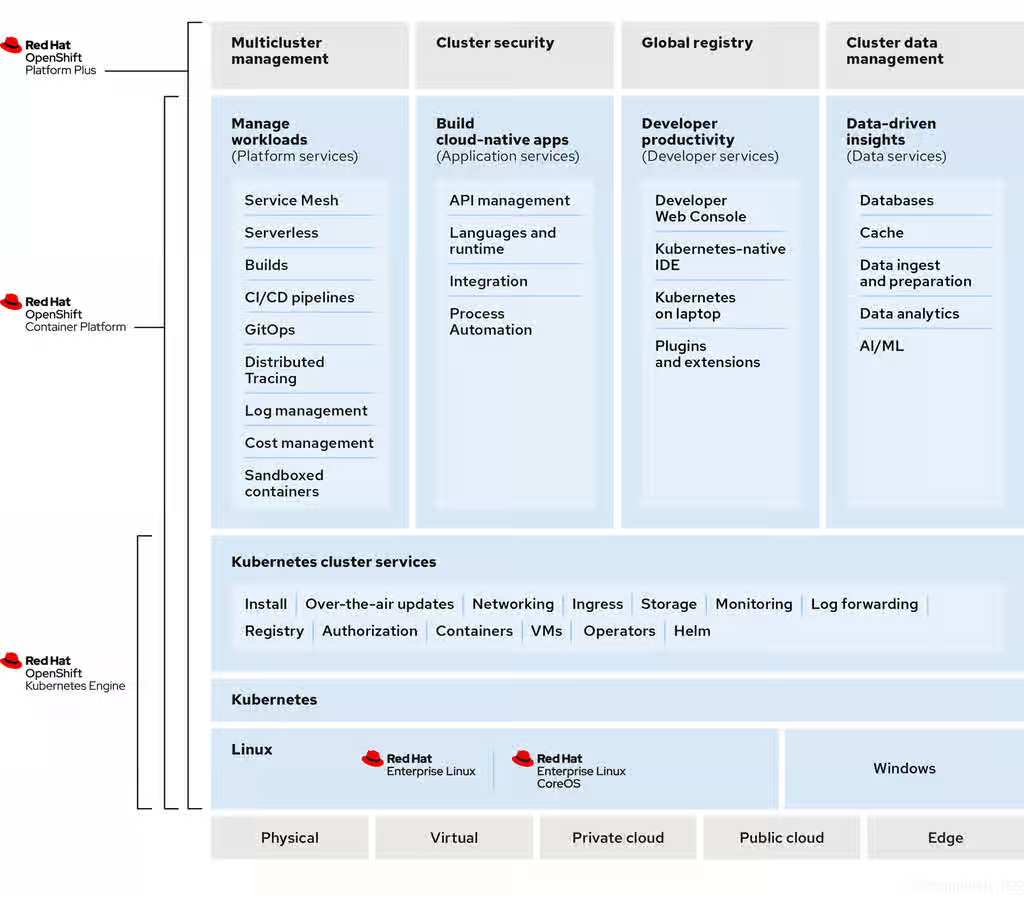
OpenShift Container Platform is a Kubernetes environment for managing containers and their dependencies on various computing platforms, such as bare metal, virtualized, on-premise, and in cloud. OpenShift Container Platform offers usability, stability, and customization of its components.
OpenShift Container Platform utilises a number of computing resources, known as nodes. A node has a lightweight, secure operating system based on Red Hat Enterprise Linux (RHEL), known as Red Hat Enterprise Linux CoreOS (RHCOS).
After a node is booted and configured, it obtains a container runtime, such as CRI-O or Docker, for managing and running the images of container workloads scheduled to it. The Kubernetes agent, or kubelet schedules container workloads on the node. The kubelet is responsible for registering the node with the cluster and receiving the details of container workloads.
OpenShift Container Platform configures and manages the networking, load balancing and routing of the cluster. OpenShift Container Platform adds cluster services for monitoring the cluster health and performance, logging, and for managing upgrades.
The container image registry and software catalog provide Red Hat certified products and community built softwares for providing various application services within the cluster. These applications and services manage the applications deployed in the cluster, databases, frontends and user interfaces, application runtimes and business automation, and developer services for development and testing of container applications.
You can manage applications within the cluster either manually by configuring deployments of containers running from pre-built images or through resources known as Operators. You can build custom images from pre-build images and source code, and store these custom images locally in an internal, private or public registry.
The Multicluster Management layer can manage multiple clusters including their deployment, configuration, compliance and distribution of workloads in a single console.
2.2. OpenShift Container Platform use cases
Your organization can use OpenShift Container Platform to modernize applications, optimize infrastructure, and enhance operational efficiency.
OpenShift Container Platform is widely adopted across industries to support various use cases, including the following cases:
- OpenShift virtualization
- Provides a unified platform for managing virtual machines (VMs) and containers in parallel, which streamlines operations and reduces complexity.
- Provides a robust infrastructure to scale VM workloads efficiently.
Provides enhanced security features to protect VM environments, ensuring compliance and data integrity.
For detailed implementation guidelines and a sample architecture, refer to the "OpenShift Virtualization - Reference Implementation Guide" in the Additional resources section. This document offers best practices for deploying OpenShift as a hosting solution for virtualization workloads, designed for environments transitioning from platforms such as VMware Cloud Foundation, VMware vSphere Foundation, Red Hat Virtualization, and OpenStack to OpenShift Virtualization.
- Application modernization including artificial intelligence and machine learning (AI/ML) operations
- Enables containerization and refactoring of legacy applications.
- Preserves business logic while making applications cloud-ready and maintainable.
- Supports model training and inference workloads with standardized ML infrastructure.
- Seamlessly integrates with data science workflows.
- Multi-cloud and hybrid cloud deployments
- Provides a consistent platform across on-premises data centers and multiple public clouds.
- Helps avoid vendor lock-in and optimize workload placement.
- DevOps enablement
- Built-in continuous delivery and continuous integration (CI/CD) pipelines and GitOps workflows streamline software development.
- Offers developer self-service capabilities to accelerate software delivery.
- Edge computing
- Enables distributed computing closer to data sources in industries such as telecommunications, retail, and manufacturing.
- Supports lightweight deployment patterns, including three-node clusters, single-node clusters and Red Hat Device Edge or MicroShift.
- Provides support for on-premises deployments.
- Regulatory compliance
- Provides robust security features to meet compliance requirements for financial services, healthcare, and government agencies.
- Microservices architecture
- Supports cloud-native application development using service mesh, API management, and serverless capabilities.
- Enterprise SaaS delivery
- Facilitates multi-tenant SaaS application deployment with consistent operations.
- Includes features like Hosted Control Planes, cluster-as-a-service, and fleet-level management with Advanced Cluster Management (ACM) and Advanced Cluster Security (ACS).
For additional recommended solutions tailored to various use cases, see "Explore Solution Patterns" in the Additional resources section.
2.3. Additional resources
Chapter 3. Learn more about OpenShift Container Platform
To better use OpenShift Container Platform, you should first learn about and better understand how OpenShift Container Platform functions.
You can use the following sections to find content to help you learn about OpenShift Container Platform.
- Learning and support
Learn about OpenShift Container Platform Optional additional resources Content from www.openshift.com is not included.What’s new in OpenShift Container Platform
Content from www.openshift.com is not included.OpenShift blog
Content from learn.openshift.com is not included.OpenShift Interactive Learning Portal
- Architecture
Learn about OpenShift Container Platform Optional additional resources Content from www.openshift.com is not included.Enterprise Kubernetes with OpenShift
- Installation
Explore the following OpenShift Container Platform installation tasks:
Learn about installation on OpenShift Container Platform Optional additional resources Selecting a cluster installation method and preparing it for users
- Other cluster installer tasks
Learn about other installer tasks on OpenShift Container Platform Optional additional resources - Install a cluster in a restricted network
Learn about installing in a restricted network Optional additional resources If your cluster uses user-provisioned infrastructure, and the cluster does not have full access to the internet, you must mirror the OpenShift Container Platform installation images.
- Install a cluster in an existing network
Learn about installing in a restricted network Optional additional resources If you use an existing Virtual Private Cloud (VPC) in Amazon Web Services (AWS) or Google Cloud or an existing VNet on Microsoft Azure, you can install a cluster
- Cluster administration
Learn about OpenShift Container Platform cluster activities Optional additional resources Optional cluster capabilities in OpenShift Container Platform 4.21
- Managing cluster components
Learn about managing cluster components Optional additional resources Manage compute and control plane machines with machine sets
Apply autoscaling to an OpenShift Container Platform cluster
Manage Ingress, API server, and Service certificates
- Changing cluster components
Learn more about changing cluster components Optional additional resources Use custom resource definitions (CRDs) to modify the cluster
- Observe a cluster
Learn about OpenShift Container Platform Optional additional resources This content is not included.Release notes for the Red Hat OpenShift Distributed Tracing Platform
This content is not included.Red Hat OpenShift Distributed Tracing Platform
This content is not included.Receiving telemetry data from multiple clusters
- Storage activities
Learn about OpenShift Container Platform Optional additional resources - Application Site Reliability Engineer (App SRE)
Learn about OpenShift Container Platform Optional additional resources - Developing applications
OpenShift Container Platform is a platform for developing and deploying containerized applications. Read the following OpenShift Container Platform documentation, so that you can better understand OpenShift Container Platform functions:
Learn about application development in OpenShift Container Platform Optional additional resources This content is not included.Getting started with OpenShift for developers (interactive tutorial)
This content is not included.Red Hat OpenShift Dev Spaces (formerly Red Hat CodeReady Workspaces)
- Hosted control planes
Learn about hosted control planes Optional additional resources Preparing to deploy
Deploying hosted control planes
Deploying hosted control planes in a disconnected environment
Chapter 4. Kubernetes overview
You can run and manage container-based workloads by using Kubernetes, an open source container orchestration tool developed by Google.
The most common Kubernetes use case is to deploy an array of interconnected microservices, building an application in a cloud native way. You can create Kubernetes clusters that can span hosts across on-premise, public, private, or hybrid clouds.
Traditionally, applications were deployed on top of a single operating system. With virtualization, you can split the physical host into several virtual hosts. Working on virtual instances on shared resources is not optimal for efficiency and scalability. Because a virtual machine (VM) consumes as many resources as a physical machine, providing resources to a VM such as CPU, RAM, and storage can be expensive. Also, you might see your application degrading in performance due to virtual instance usage on shared resources.
Figure 4.1. Evolution of container technologies for classical deployments
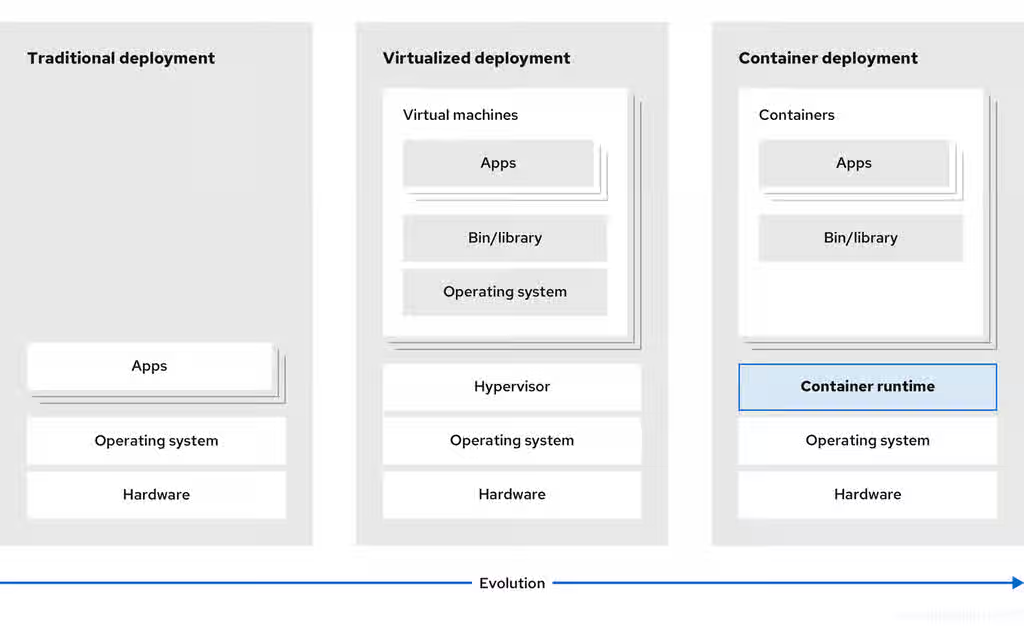
To solve this problem, you can use containerization technologies that segregate applications in a containerized environment. Similar to a VM, a container has its own filesystem, vCPU, memory, process space, dependencies, and more. Containers are decoupled from the underlying infrastructure, and are portable across clouds and OS distributions. Containers are inherently much lighter than a fully-featured OS, and are lightweight isolated processes that run on the operating system kernel. VMs are slower to boot, and are an abstraction of physical hardware. VMs run on a single machine with the help of a hypervisor.
You can perform the following actions by using Kubernetes:
- Sharing resources
- Orchestrating containers across multiple hosts
- Installing new hardware configurations
- Running health checks and self-healing applications
- Scaling containerized applications
4.1. Kubernetes components
To effectively manage and maintain a Kubernetes cluster, you must understand its core infrastructure and control plane components. This reference details the function of each component and how they interact to run your workloads.
Table 4.1. Kubernetes components
| Component | Purpose |
|---|---|
|
| Runs on every node in the cluster and maintains the network traffic between the Kubernetes resources. |
|
| Governs the state of the cluster. |
|
| Allocates pods to nodes. |
|
| Stores cluster data. |
|
| Validates and configures data for the API objects. |
|
| Runs on nodes and reads the container manifests. Ensures that the defined containers have started and are running. |
|
|
Allows you to define how you want to run workloads. Use the |
| Node | Node is a physical machine or a VM in a Kubernetes cluster. The control plane manages every node and schedules pods across the nodes in the Kubernetes cluster. |
| container runtime | container runtime runs containers on a host operating system. You must install a container runtime on each node so that pods can run on the node. |
| Persistent storage | Stores the data even after the device is shut down. Kubernetes uses persistent volumes to store the application data. |
|
| Stores and accesses the container images. |
| Pod | The pod is the smallest logical unit in Kubernetes. A pod contains one or more containers to run in a worker node. |
4.2. Kubernetes resources
To extend and automate your Kubernetes cluster capabilities, you can use custom resources and Operators.
A custom resource is an extension of the Kubernetes API. Operators are software extensions which manage applications and their components with the help of custom resources. Kubernetes uses a declarative model when you want a fixed desired result while dealing with cluster resources. By using Operators, Kubernetes defines its states in a declarative way. You can modify the Kubernetes cluster resources by using imperative commands. An Operator acts as a control loop which continuously compares the desired state of resources with the actual state of resources and puts actions in place to bring reality in line with the desired state.
Figure 4.2. Kubernetes cluster overview
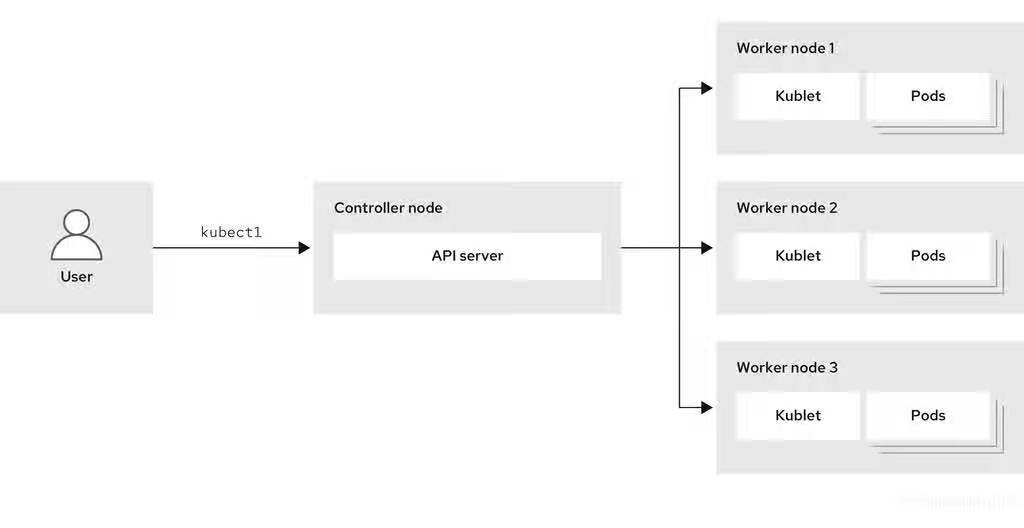
Table 4.2. Kubernetes Resources
| Resource | Purpose |
|---|---|
| Service | Kubernetes uses services to expose a running application on a set of pods. |
|
|
Kubernetes uses the |
| Deployment | A resource object that maintains the life cycle of an application. |
Kubernetes is a core component of an OpenShift Container Platform. You can use OpenShift Container Platform for developing and running containerized applications. With its foundation in Kubernetes, the OpenShift Container Platform incorporates the same technology that serves as the engine for massive telecommunications, streaming video, gaming, banking, and other applications. You can extend your containerized applications beyond a single cloud to on-premise and multi-cloud environments by using the OpenShift Container Platform.
4.3. Kubernetes architecture
You can run Kubernetes containers across various machines and environments.
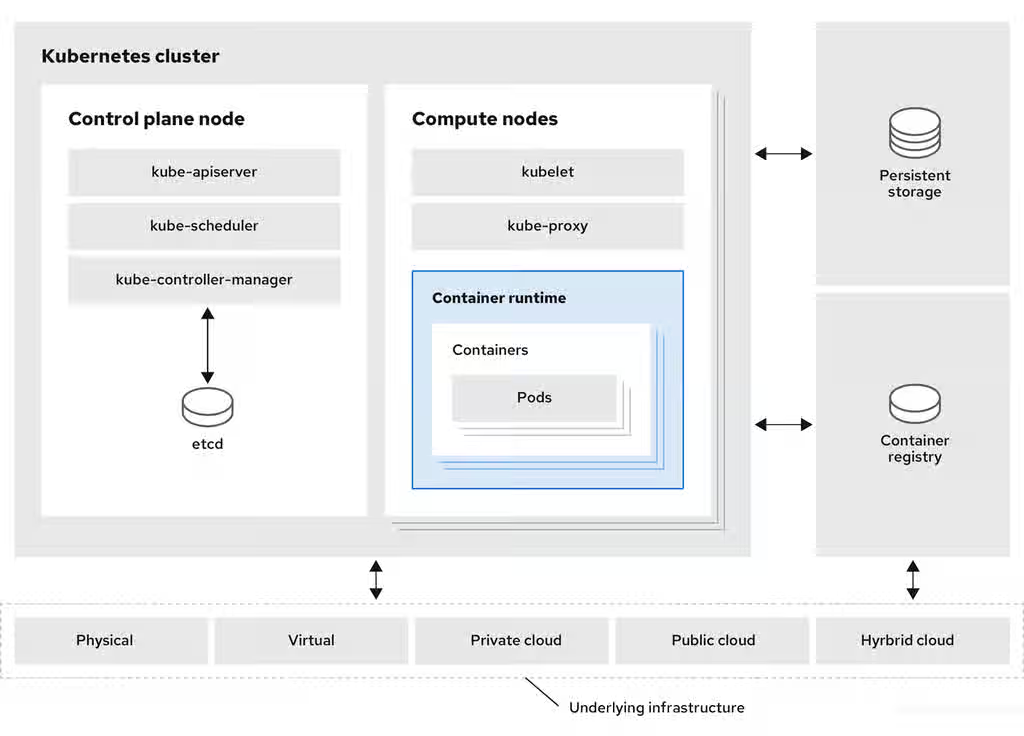
A cluster is a single computational unit consisting of multiple nodes in a cloud environment. A Kubernetes cluster includes a control plane and compute nodes.
The control plane node controls and maintains the state of a cluster. You can run the Kubernetes application by using compute nodes. You can use the Kubernetes namespace to differentiate cluster resources in a cluster. Namespace scoping is applicable for resource objects, such as deployments, services, and pods. You cannot use namespace for cluster-wide resource objects such as storage classes, nodes, and persistent volumes.
Figure 4.3. Architecture of Kubernetes
4.4. Kubernetes conceptual guidelines
To more effectively deploy and scale applications, you should understand how Kubernetes aligns with OpenShift Container Platform.
Before getting started with the OpenShift Container Platform, consider these conceptual guidelines of Kubernetes:
- Start with one or more worker nodes to run the container workloads.
- Manage the deployment of those workloads from one or more control plane nodes.
- Wrap containers in a deployment unit called a pod. By using pods provides extra metadata with the container and offers the ability to group several containers in a single deployment entity.
- Create special kinds of assets. For example, services are represented by a set of pods and a policy that defines how they are accessed. This policy allows containers to connect to the services that they need even if they do not have the specific IP addresses for the services. Replication controllers are another special asset that indicates how many pod replicas are required to run at a time. You can use this capability to automatically scale your application to adapt to its current demand.
The API to OpenShift Container Platform cluster is 100% Kubernetes. Nothing changes between a container running on any other Kubernetes and running on OpenShift Container Platform. No changes to the application. OpenShift Container Platform brings added-value features to provide enterprise-ready enhancements to Kubernetes. OpenShift Container Platform CLI tool (oc) is compatible with kubectl. While the Kubernetes API is 100% accessible within OpenShift Container Platform, the kubectl command-line lacks many features that could make it more user-friendly. OpenShift Container Platform offers a set of features and command-line tool like oc. Although Kubernetes excels at managing your applications, it does not specify or manage platform-level requirements or deployment processes. Powerful and flexible platform management tools and processes are important benefits that OpenShift Container Platform offers. You must add authentication, networking, security, monitoring, and logs management to your containerization platform.
Chapter 5. Red Hat OpenShift editions
To help you choose the ideal deployment model for your organization, you can compare the available Red Hat OpenShift editions.
Red Hat OpenShift is offered in several editions to support a wide range of deployment models and operational preferences. Each edition delivers a consistent Kubernetes platform with integrated tools, security features, and developer experiences. OpenShift is available in cloud services and self-managed editions.
- Cloud services editions
- Red Hat OpenShift offers various cloud service editions to cater to different organizational needs. These editions provide fully managed application platforms from major cloud providers.
- Red Hat OpenShift Service on AWS (ROSA)
- A fully managed application platform that helps organizations build, deploy, and scale applications in a native AWS environment. For more information, see "Red Hat OpenShift Service on AWS" in the Additional resources section.
- Microsoft Azure Red Hat OpenShift
- A fully managed application platform that helps organizations build, deploy, and scale applications on Azure. For more information, see "Red Hat OpenShift Service on AWS" in the Additional resources section.
- Red Hat OpenShift Dedicated
- A managed Red Hat OpenShift offering available on Google Cloud. For more information, see "Red Hat OpenShift Dedicated" in the Additional resources section.
- Red Hat OpenShift on IBM Cloud
- A managed OpenShift cloud service that reduces operational complexity and helps developers build and scale applications on IBM Cloud. For more information, see Red Hat OpenShift on IBM Cloud in the Additional resources section.
- Self-managed editions
- Red Hat OpenShift offers self-managed editions for organizations that prefer to deploy, configure, and manage OpenShift on their own infrastructure. These editions provide flexibility and control over the platform while leveraging the capabilities of OpenShift.
- Red Hat OpenShift Container Platform (OCP)
- Provides complete set of operations and developer services and tools for building and scaling containerized applications. For more information, see "Red Hat OpenShift Container Platform" in the Additional resources section.
- Red Hat OpenShift Platform Plus
- Builds on the capabilities of OpenShift Container Platform. For more information, see "Red Hat OpenShift Platform Plus" in the Additional resources section.
- Red Hat OpenShift Kubernetes Engine
- Delivers the foundational, security-focused capabilities of enterprise Kubernetes on Red Hat Enterprise Linux CoreOS (RHCOS) to run containers in hybrid cloud environments. For more information, see "Red Hat OpenShift Kubernetes Engine" in the Additional resources section.
- Red Hat OpenShift Virtualization Engine
- Provides the virtualization capabilities of Red Hat OpenShift in a streamlined, cost-effective solution to deploy, manage, and scale VMs exclusively. For more information, see "Red Hat OpenShift Virtualization Engine" in the Additional resources section.
5.1. Additional resources
- This content is not included.Red Hat OpenShift Service on AWS (Red Hat product page)
- This content is not included.Microsoft Azure Red Hat OpenShift (Red Hat product page)
- This content is not included.Red Hat OpenShift Dedicated (Red Hat product page)
- This content is not included.Red Hat OpenShift on IBM Cloud (Red Hat product page)
- This content is not included.Red Hat OpenShift Container Platform (Red Hat product page)
- This content is not included.Red Hat OpenShift Platform Plus (Red Hat product page)
- This content is not included.Red Hat OpenShift Kubernetes Engine (Red Hat product page)
- This content is not included.Red Hat OpenShift Virtualization Engine (Red Hat product page)
Chapter 6. Glossary of common terms for OpenShift Container Platform
To better use OpenShift Container Platform, you should first understand common Kubernetes and OpenShift Container Platform terms.
- access policies
- A set of roles that dictate how users, applications, and entities within a cluster interact with one another. An access policy increases cluster security.
- admission plugins
- Admission plugins enforce security policies, resource limitations, or configuration requirements.
- authentication
- To control access to an OpenShift Container Platform cluster, a cluster administrator can configure user authentication to ensure only approved users access the cluster. To interact with an OpenShift Container Platform cluster, you must authenticate with the OpenShift Container Platform API. You can authenticate by providing an OAuth access token or an X.509 client certificate in your requests to the OpenShift Container Platform API.
- bootstrap
- A temporary machine that runs minimal Kubernetes and deploys the OpenShift Container Platform control plane.
- build
- A build is the process of transforming input parameters, such as source code, into a runnable container image. This process is defined by a BuildConfig object, which specifies the entire build workflow. OpenShift Container Platform utilizes Kubernetes to create containers from the build images and push them to the integrated container registry.
- certificate signing requests (CSRs)
- A resource requests a denoted signer to sign a certificate. This request might get approved or denied.
- Cluster Version Operator (CVO)
- An Operator that checks with the OpenShift Container Platform Update Service to see the valid updates and update paths based on current component versions and information in the graph.
- compute nodes
- Nodes that are responsible for executing workloads for cluster users.
- configuration drift
- A situation where the configuration on a node does not match what the machine config specifies.
- container
- Container is a lightweight, portable application instance that runs in OCI-compliant environments on compute nodes. Each container is a runtime instance of an Open Container Initiative (OCI)-compliant image, which is a binary package containing the application and its dependencies. A single compute node can host multiple containers, with its capacity determined by the memory and CPU resources available, whether on cloud infrastructure, physical hardware, or virtualized environments.
- container orchestration engine
- Software that automates the deployment, management, scaling, and networking of containers.
- container workloads
- Applications that are packaged and deployed in containers.
- control groups (cgroups)
- Partitions sets of processes into groups to manage and limit the resources processes consume.
- control plane
- A container orchestration layer that exposes the API and interfaces to define, deploy, and manage the life cycle of containers. Control planes are also known as control plane machines.
- CRI-O
- A Kubernetes native container runtime implementation that integrates with the operating system to deliver an efficient Kubernetes experience.
- Deployment and DeploymentConfig
OpenShift Container Platform supports both Kubernetes Deployment objects and OpenShift Container Platform DeploymentConfig objects for managing application rollout and scaling.
A Deployment object defines how an application is deployed as pods. It specifies the container image to pull from the registry, the number of replicas to maintain, and the labels that guide scheduling onto compute nodes. The Deployment creates and manages a ReplicaSet, which ensures the specified number of pods are running. Additionally, Deployment objects support various rollout strategies to update pods while maintaining application availability.
A DeploymentConfig object extends Deployment functionality by introducing change triggers, which automatically create new deployment versions when a new container image version becomes available or when other defined changes occur. This enables automated rollout management within OpenShift Container Platform.
- Dockerfile
- A text file that contains the user commands to perform on a terminal to assemble the image.
- hosted control planes
A OpenShift Container Platform feature that enables hosting a control plane on the OpenShift Container Platform cluster from its data plane and workers. This model performs the following actions:
- Optimize infrastructure costs required for the control planes.
- Improve the cluster creation time.
- Enable hosting the control plane using the Kubernetes native high level primitives. For example, deployments and stateful sets.
- Allow a strong network segmentation between the control plane and workloads.
- hybrid cloud deployments
- Deployments that deliver a consistent platform across bare metal, virtual, private, and public cloud environments. This offers speed, agility, and portability.
- Ignition
- A utility that RHCOS uses to manipulate disks during initial configuration. It completes common disk tasks, including partitioning disks, formatting partitions, writing files, and configuring users.
- installer-provisioned infrastructure
- The installation program deploys and configures the infrastructure that the cluster runs on.
- kubelet
- A primary node agent that runs on each node in the cluster to ensure that containers are running in a pod.
- Kubernetes
- Kubernetes is an open source container orchestration engine for automating deployment, scaling, and management of containerized applications.
- kubernetes manifest
- Specifications of a Kubernetes API object in a JSON or YAML format. A configuration file can include deployments, config maps, secrets, daemon sets.
- Machine Config Daemon (MCD)
- A daemon that regularly checks the nodes for configuration drift.
- Machine Config Operator (MCO)
- An Operator that applies the new configuration to your cluster machines.
- machine config pools (MCP)
- A group of machines, such as control plane components or user workloads, that are based on the resources that they handle.
- metadata
- Additional information about cluster deployment artifacts.
- microservices
- An approach to writing software. Applications can be separated into the smallest components, independent from each other by using microservices.
- mirror registry
- A registry that holds the mirror of OpenShift Container Platform images.
- monolithic applications
- Applications that are self-contained, built, and packaged as a single piece.
- namespaces
- A namespace isolates specific system resources that are visible to all processes. Inside a namespace, only processes that are members of that namespace can see those resources.
- networking
- Network information of OpenShift Container Platform cluster.
- node
- A compute machine in the OpenShift Container Platform cluster. A node is either a virtual machine (VM) or a physical machine.
- OpenShift CLI (
oc) - A command line tool to run OpenShift Container Platform commands on the terminal.
- OpenShift Dedicated
- A managed RHEL OpenShift Container Platform offering on Amazon Web Services (AWS) and Google Cloud. OpenShift Dedicated focuses on building and scaling applications.
- OpenShift Update Service (OSUS)
- For clusters with internet access, Red Hat Enterprise Linux (RHEL) provides over-the-air updates by using an OpenShift update service as a hosted service located behind public APIs.
- OpenShift image registry
- A registry provided by OpenShift Container Platform to manage images.
- Operator
The preferred method of packaging, deploying, and managing a Kubernetes application in an OpenShift Container Platform cluster. An Operator is a Kubernetes-native application designed to translate operational knowledge into a software that is packaged and shared with customers. Traditionally, tasks such as installation, configuration, scaling, updates, and failover were managed manually by administrators by using scripts or automation tools like Ansible. Operators bring these capabilities into Kubernetes, making them natively integrated and automated within the cluster.
Operators manage both Day 1 operations such as installation and configuration, and Day 2 operations such as scaling, updates, backups, failover and restores. By leveraging Kubernetes APIs and concepts, Operators provide an automated and consistent way to manage complex applications.
- OperatorHub
- A platform that contains various OpenShift Container Platform Operators to install.
- Operator Lifecycle Manager (OLM)
- OLM helps you to install, update, and manage the lifecycle of Kubernetes native applications. OLM is an open source toolkit designed to manage Operators in an effective, automated, and scalable way.
- OSTree
- An upgrade system for Linux-based operating systems that performs atomic upgrades of complete file system trees. OSTree tracks meaningful changes to the file system tree using an addressable object store, and is designed to complement existing package management systems.
- over-the-air (OTA) updates
- The OpenShift Container Platform Update Service (OSUS) provides over-the-air updates to OpenShift Container Platform, including Red Hat Enterprise Linux CoreOS (RHCOS).
- pod
- A pod is one or more containers deployed together on one host. It consists of a colocated group of containers with shared resources such as volumes and IP addresses. A pod is also the smallest compute unit defined, deployed, and managed. In OpenShift Container Platform, pods replace individual application containers as the smallest deployable unit. Pods are the orchestrated unit in OpenShift Container Platform. OpenShift Container Platform schedules and runs all containers in a pod on the same node. Complex applications are made up of multiple pods, each with their own containers. They interact externally and also with another inside the OpenShift Container Platform environment.
- private registry
- OpenShift Container Platform can use any server implementing the container image registry API as a source of the image which helps the developers to push and pull their private container images.
- project
OpenShift Container Platform uses projects to enable groups of users or developers to work together. A project defines the scope of resources, manages user access, and enforces resource quotas and limits.
A project is a Kubernetes namespace with additional annotations that provide role-based access control (RBAC) and management capabilities. It serves as the central mechanism for organizing resources, ensuring isolation between different user groups.
- public registry
- OpenShift Container Platform can use any server implementing the container image registry API as a source of the image which allows the developers to push and pull their public container images.
- RHEL OpenShift Container Platform Cluster Manager
- A managed service where you can install, modify, operate, and upgrade your OpenShift Container Platform clusters.
- RHEL Quay Container Registry
- A Quay.io container registry that serves most of the container images and Operators to OpenShift Container Platform clusters.
- replication controllers
- An asset that indicates how many pod replicas are required to run at a time.
- ReplicaSet and ReplicationController
-
The Kubernetes
ReplicaSetandReplicationControllerobjects ensure that the desired number of pod replicas are running at all times. If a pod fails, exits, or is deleted, these controllers automatically create new pods to maintain the specified replica count. Conversely, if there are more pods than required, the ReplicaSet or ReplicationController scales down by terminating excess pods to match the defined replica count. - role-based access control (RBAC)
- A key security control to ensure that cluster users and workloads have only access to resources required to execute their roles.
- route
- A route is a way to expose a service by giving it an externally reachable hostname, such as www.example.com. Each route consists of a route name, a service selector, and optionally, a security configuration.
- router
- A router processes defined routes and their associated service endpoints, enabling external clients to access applications. While deploying a multi-tier application in OpenShift Container Platform is straightforward, external traffic cannot reach the application without the routing layer.
- scaling
- The increasing or decreasing of resource capacity.
- service
- A service in OpenShift Container Platform defines a logical set of pods and the access policies for reaching them. It provides a stable internal IP address and hostname, ensuring seamless communication between application components as pods are created and destroyed.
- Source-to-Image (S2I) image
- An image created based on the programming language of the application source code in OpenShift Container Platform to deploy applications.
- storage
- OpenShift Container Platform supports many types of storage, both for on-premise and cloud providers. You can manage container storage for persistent and non-persistent data in an OpenShift Container Platform cluster.
- telemetry
- A component to collect information such as size, health, and status of OpenShift Container Platform.
- template
- A template describes a set of objects that can be parameterized and processed to produce a list of objects for creation by OpenShift Container Platform.
- user-provisioned infrastructure
- You can install OpenShift Container Platform on the infrastructure that you provide. You can use the installation program to generate the assets required to provision the cluster infrastructure, create the cluster infrastructure, and then deploy the cluster to the infrastructure that you provided.
- web console
- A user interface (UI) to manage OpenShift Container Platform.
Chapter 7. About OpenShift Kubernetes Engine
You can use the Red Hat OpenShift Kubernetes Engine as a way to launch containers in an enterprise-class Kubernetes production platform.
As of 27 April 2020, Red Hat has decided to rename Red Hat OpenShift Container Engine to Red Hat OpenShift Kubernetes Engine to better communicate what value the product offering delivers.
OpenShift Kubernetes Engine is a subscription offering that provides OpenShift Container Platform with a limited set of supported features at a lower list price. OpenShift Kubernetes Engine and OpenShift Container Platform are the same product and, therefore, all software and features are delivered in both. There is only one download, OpenShift Container Platform. OpenShift Kubernetes Engine uses the OpenShift Container Platform documentation and support services and bug errata for this reason.
You download and install OpenShift Kubernetes Engine the same way as OpenShift Container Platform, as they are the same binary distribution, but OpenShift Kubernetes Engine offers a subset of the features that OpenShift Container Platform offers.
7.1. OpenShift Kubernetes Engine and OpenShift Container Platform comparison
To help decide whether to use OpenShift Kubernetes Engine or OpenShift Container Platform, you should understand the similarities and differences between the two platforms.
You can see the similarities and differences in the following table:
Table 7.1. Product comparison for OpenShift Kubernetes Engine and OpenShift Container Platform
| OpenShift Kubernetes Engine | OpenShift Container Platform | ||
|---|---|---|---|
| Fully Automated Installers | Yes | Yes | |
| Over the Air Smart Upgrades | Yes | Yes | |
| Enterprise Secured Kubernetes | Yes | Yes | |
| Kubectl and oc automated command line | Yes | Yes | |
| Operator Lifecycle Manager (OLM) | Yes | Yes | |
| Administrator Web console | Yes | Yes | |
| OpenShift Virtualization | Yes | Yes | |
| User Workload Monitoring | Yes | ||
| Cluster Monitoring | Yes | Yes | |
| Cost Management SaaS Service | Yes | Yes | |
| Platform Logging | Yes | ||
| Developer Web Console | Yes | ||
| Developer Application Catalog | Yes | ||
| Source to Image and Builder Automation (Tekton) | Yes | ||
| OpenShift Service Mesh (Maistra and Kiali) | Yes | ||
| Distributed Tracing Platform | Yes | ||
| OpenShift Serverless (Knative) | Yes | ||
| OpenShift Pipelines (Jenkins and Tekton) | Yes | ||
| Embedded Component of IBM Cloud® Pak and RHT MW Bundles | Yes | ||
| OpenShift sandboxed containers | Yes | ||
- Core Kubernetes and container orchestration
OpenShift Kubernetes Engine offers full access to an enterprise-ready Kubernetes environment that is easy to install and offers an extensive compatibility test matrix with many of the software elements that you might use in your data center.
OpenShift Kubernetes Engine offers the same service level agreements, bug fixes, and common vulnerabilities and errors protection as OpenShift Container Platform. OpenShift Kubernetes Engine includes a Red Hat Enterprise Linux (RHEL) Virtual Datacenter and Red Hat Enterprise Linux CoreOS (RHCOS) entitlement that allows you to use an integrated Linux operating system with container runtime from the same technology provider.
The OpenShift Kubernetes Engine subscription is compatible with the Red Hat OpenShift support for Windows Containers subscription.
- Enterprise-ready configurations
OpenShift Kubernetes Engine uses the same security options and default settings as the OpenShift Container Platform. Default security context constraints, pod security policies, best practice network and storage settings, service account configuration, SELinux integration, HAproxy edge routing configuration, and all other standard protections that OpenShift Container Platform offers are available in OpenShift Kubernetes Engine. OpenShift Kubernetes Engine offers full access to the integrated monitoring solution that OpenShift Container Platform uses, which is based on Prometheus and offers deep coverage and alerting for common Kubernetes issues.
OpenShift Kubernetes Engine uses the same installation and upgrade automation as OpenShift Container Platform.
- Standard infrastructure services
With an OpenShift Kubernetes Engine subscription, you receive support for all storage plugins that OpenShift Container Platform supports.
In terms of networking, OpenShift Kubernetes Engine offers full and supported access to the Kubernetes Container Network Interface (CNI) and therefore allows you to use any third-party SDN that supports OpenShift Container Platform. It also allows you to use the included Open vSwitch software defined network to its fullest extent. OpenShift Kubernetes Engine allows you to take full advantage of the OVN Kubernetes overlay, Multus, and Multus plugins that are supported on OpenShift Container Platform. OpenShift Kubernetes Engine allows customers to use a Kubernetes Network Policy to create microsegmentation between deployed application services on the cluster.
You can also use the
RouteAPI objects that are found in OpenShift Container Platform, including its sophisticated integration with the HAproxy edge routing layer as an out of the box Kubernetes Ingress Controller.- Core user experience
-
OpenShift Kubernetes Engine users have full access to Kubernetes Operators, pod deployment strategies, Helm, and OpenShift Container Platform templates. OpenShift Kubernetes Engine users can use both the
ocandkubectlcommand-line interfaces. OpenShift Kubernetes Engine also offers an administrator web-based console that shows all aspects of the deployed container services and offers a container-as-a service experience. OpenShift Kubernetes Engine grants access to the Operator Life Cycle Manager that helps you control access to content on the cluster and life cycle operator-enabled services that you use. With an OpenShift Kubernetes Engine subscription, you receive access to the Kubernetes namespace, the OpenShiftProjectAPI object, and cluster-level Prometheus monitoring metrics and events. - Maintained and curated content
- With an OpenShift Kubernetes Engine subscription, you receive access to the OpenShift Container Platform content from the Red Hat Ecosystem Catalog and Red Hat Connect ISV marketplace. You can access all maintained and curated content that the OpenShift Container Platform eco-system offers.
- OpenShift Data Foundation compatible
- OpenShift Kubernetes Engine is compatible and supported with your purchase of OpenShift Data Foundation.
- Red Hat Middleware compatible
- OpenShift Kubernetes Engine is compatible and supported with individual Red Hat Middleware product solutions. Red Hat Middleware Bundles that include OpenShift embedded in them only contain OpenShift Container Platform.
- OpenShift Serverless
- OpenShift Kubernetes Engine does not include OpenShift Serverless support. Use OpenShift Container Platform for this support.
- Quay Integration compatible
- OpenShift Kubernetes Engine is compatible and supported with a Red Hat Quay purchase.
- OpenShift Virtualization
- OpenShift Kubernetes Engine includes support for the Red Hat product offerings derived from the kubevirt.io open source project.
- Advanced cluster management
OpenShift Kubernetes Engine is compatible with your additional purchase of Red Hat Advanced Cluster Management (RHACM) for Kubernetes. An OpenShift Kubernetes Engine subscription does not offer a cluster-wide log aggregation solution.
Red Hat OpenShift Service Mesh capabilities derived from the open-source istio.io and kiali.io projects that offer OpenTracing observability for containerized services on OpenShift Container Platform are not supported in OpenShift Kubernetes Engine.
- Advanced networking
- The standard networking solutions in OpenShift Container Platform are supported with an OpenShift Kubernetes Engine subscription. The OpenShift Container Platform Kubernetes CNI plugin for automation of multi-tenant network segmentation between OpenShift Container Platform projects is entitled for use with OpenShift Kubernetes Engine. OpenShift Kubernetes Engine offers all the granular control of the source IP addresses that are used by application services on the cluster. Those egress IP address controls are entitled for use with OpenShift Kubernetes Engine. OpenShift Container Platform offers ingress routing to on cluster services that use non-standard ports when no public cloud provider is in use via the VIP pods found in OpenShift Container Platform. That ingress solution is supported in OpenShift Kubernetes Engine. OpenShift Kubernetes Engine users are supported for the Kubernetes ingress control object, which offers integrations with public cloud providers. Red Hat Service Mesh, which is derived from the istio.io open source project, is not supported in OpenShift Kubernetes Engine. Also, the Kourier Ingress Controller found in OpenShift Serverless is not supported on OpenShift Kubernetes Engine.
- OpenShift sandboxed containers
- OpenShift Kubernetes Engine does not include OpenShift sandboxed containers. Use OpenShift Container Platform for this support.
- Developer experience
With OpenShift Kubernetes Engine, the following capabilities are not supported:
- The OpenShift Container Platform developer experience utilities and tools, such as Red Hat OpenShift Dev Spaces.
- The OpenShift Container Platform pipeline feature that integrates a streamlined, Kubernetes-enabled Jenkins and Tekton experience in the user’s project space.
- The OpenShift Container Platform source-to-image feature, which allows you to easily deploy source code, dockerfiles, or container images across the cluster.
- Build strategies, builder pods, or Tekton container deployments.
-
The
ododeveloper command line. - The developer persona in the OpenShift Container Platform web console.
- Feature summary
The following table is a summary of the feature availability in OpenShift Kubernetes Engine and OpenShift Container Platform. Where applicable, it includes the name of the Operator that enables a feature.
Table 7.2. Features in OpenShift Kubernetes Engine and OpenShift Container Platform
Feature OpenShift Kubernetes Engine OpenShift Container Platform Operator name Fully Automated Installers (installer-provisioned infrastructure)
Included
Included
N/A
Customizable Installers (user-provisioned infrastructure)
Included
Included
N/A
Disconnected Installation
Included
Included
N/A
Red Hat Enterprise Linux (RHEL) or Red Hat Enterprise Linux CoreOS (RHCOS) entitlement
Included
Included
N/A
Existing RHEL manual attach to cluster (BYO)
Included
Included
N/A
CRIO Runtime
Included
Included
N/A
Over the Air Smart Upgrades and Operating System (RHCOS) Management
Included
Included
N/A
Enterprise Secured Kubernetes
Included
Included
N/A
Kubectl and
ocautomated command lineIncluded
Included
N/A
Auth Integrations, RBAC, SCC, Multi-Tenancy Admission Controller
Included
Included
N/A
Operator Lifecycle Manager (OLM)
Included
Included
N/A
Administrator web console
Included
Included
N/A
OpenShift Virtualization
Included
Included
OpenShift Virtualization Operator
Compliance Operator provided by Red Hat
Included
Included
Compliance Operator
File Integrity Operator
Included
Included
File Integrity Operator
Gatekeeper Operator
Not Included - Requires separate subscription
Not Included - Requires separate subscription
Gatekeeper Operator
Klusterlet
Not Included - Requires separate subscription
Not Included - Requires separate subscription
N/A
Kube Descheduler Operator provided by Red Hat
Included
Included
Kube Descheduler Operator
Local Storage provided by Red Hat
Included
Included
Local Storage Operator
Node Feature Discovery provided by Red Hat
Included
Included
Node Feature Discovery Operator
Performance Profile controller
Included
Included
N/A
PTP Operator provided by Red Hat
Included
Included
PTP Operator
Service Telemetry Operator provided by Red Hat
Not Included
Included
Service Telemetry Operator
SR-IOV Network Operator
Included
Included
SR-IOV Network Operator
Vertical Pod Autoscaler
Included
Included
Vertical Pod Autoscaler
Cluster Monitoring (Prometheus)
Included
Included
Cluster Monitoring
Device Manager (for example, GPU)
Included
Included
N/A
Log Forwarding
Included
Included
Red Hat OpenShift Logging Operator
Telemeter and Insights Connected Experience
Included
Included
N/A
Feature
OpenShift Kubernetes Engine
OpenShift Container Platform
Operator name
OpenShift Cloud Manager SaaS Service
Included
Included
N/A
OVS and OVN SDN
Included
Included
N/A
MetalLB
Included
Included
MetalLB Operator
HAProxy Ingress Controller
Included
Included
N/A
Ingress Cluster-wide Firewall
Included
Included
N/A
Egress Pod and Namespace Granular Control
Included
Included
N/A
Ingress Non-Standard Ports
Included
Included
N/A
Multus and Available Multus Plugins
Included
Included
N/A
Network Policies
Included
Included
N/A
IPv6 Single and Dual Stack
Included
Included
N/A
CNI Plugin ISV Compatibility
Included
Included
N/A
CSI Plugin ISV Compatibility
Included
Included
N/A
RHT and IBM® middleware à la carte purchases (not included in OpenShift Container Platform or OpenShift Kubernetes Engine)
Included
Included
N/A
ISV or Partner Operator and Container Compatibility (not included in OpenShift Container Platform or OpenShift Kubernetes Engine)
Included
Included
N/A
Embedded software catalog
Included
Included
N/A
Embedded Marketplace
Included
Included
N/A
Quay Compatibility (not included)
Included
Included
N/A
OpenShift API for Data Protection (OADP)
Included
Included
OADP Operator
RHEL Software Collections and RHT SSO Common Service (included)
Included
Included
N/A
Embedded Registry
Included
Included
N/A
Helm
Included
Included
N/A
User Workload Monitoring
Not Included
Included
N/A
Cost Management SaaS Service
Included
Included
Cost Management Metrics Operator
Platform Logging
Not Included
Included
Red Hat OpenShift Logging Operator
Developer Web Console
Not Included
Included
N/A
Developer Application Catalog
Not Included
Included
N/A
Source to Image and Builder Automation (Tekton)
Not Included
Included
N/A
OpenShift Service Mesh
Not Included
Included
OpenShift Service Mesh Operator
Feature
OpenShift Kubernetes Engine
OpenShift Container Platform
Operator name
OpenShift Serverless
Not Included
Included
OpenShift Serverless Operator
Web Terminal provided by Red Hat
Not Included
Included
Web Terminal Operator
Red Hat OpenShift Pipelines
Not Included
Included
OpenShift Pipelines Operator
Embedded Component of IBM Cloud® Pak and RHT MW Bundles
Not Included
Included
N/A
Red Hat OpenShift GitOps
Not Included
Included
Red Hat OpenShift GitOps Operator
Red Hat OpenShift Dev Spaces
Not Included
Included
Red Hat OpenShift Dev Spaces
Red Hat OpenShift Local
Not Included
Included
N/A
Quay Bridge Operator provided by Red Hat
Not Included
Included
Quay Bridge Operator
Quay Container Security provided by Red Hat
Not Included
Included
Quay Operator
Red Hat OpenShift Distributed Tracing Platform (Jaeger)
Not Included
Included
Red Hat OpenShift Distributed Tracing Platform (Jaeger) Operator
Red Hat OpenShift Kiali
Not Included
Included
Kiali Operator
Metering provided by Red Hat (deprecated)
Not Included
Included
N/A
Cost management for OpenShift
Not included
Included
N/A
JBoss Web Server provided by Red Hat
Not included
Included
JWS Operator
Red Hat Build of Quarkus
Not included
Included
N/A
Kourier Ingress Controller
Not included
Included
N/A
RHT Middleware Bundles Sub Compatibility (not included in OpenShift Container Platform)
Not included
Included
N/A
IBM Cloud® Pak Sub Compatibility (not included in OpenShift Container Platform)
Not included
Included
N/A
OpenShift Do (
odo)Not included
Included
N/A
Source to Image and Tekton Builders
Not included
Included
N/A
OpenShift Serverless FaaS
Not included
Included
N/A
IDE Integrations
Not included
Included
N/A
OpenShift sandboxed containers
Not included
Not included
OpenShift sandboxed containers Operator
Windows Machine Config Operator
Community Windows Machine Config Operator included - no subscription required
Red Hat Windows Machine Config Operator included - Requires separate subscription
Windows Machine Config Operator
Red Hat Quay
Not Included - Requires separate subscription
Not Included - Requires separate subscription
Quay Operator
Red Hat Advanced Cluster Management
Not Included - Requires separate subscription
Not Included - Requires separate subscription
Advanced Cluster Management for Kubernetes
Red Hat Advanced Cluster Security
Not Included - Requires separate subscription
Not Included - Requires separate subscription
N/A
OpenShift Data Foundation
Not Included - Requires separate subscription
Not Included - Requires separate subscription
OpenShift Data Foundation
Feature
OpenShift Kubernetes Engine
OpenShift Container Platform
Operator name
Ansible Automation Platform Resource Operator
Not Included - Requires separate subscription
Not Included - Requires separate subscription
Ansible Automation Platform Resource Operator
Business Automation provided by Red Hat
Not Included - Requires separate subscription
Not Included - Requires separate subscription
Business Automation Operator
Data Grid provided by Red Hat
Not Included - Requires separate subscription
Not Included - Requires separate subscription
Data Grid Operator
Red Hat Integration provided by Red Hat
Not Included - Requires separate subscription
Not Included - Requires separate subscription
Red Hat Integration Operator
Red Hat Integration - 3Scale provided by Red Hat
Not Included - Requires separate subscription
Not Included - Requires separate subscription
3scale
Red Hat Integration - 3Scale APICast gateway provided by Red Hat
Not Included - Requires separate subscription
Not Included - Requires separate subscription
3scale APIcast
Red Hat Integration - AMQ Broker
Not Included - Requires separate subscription
Not Included - Requires separate subscription
AMQ Broker
Red Hat Integration - AMQ Broker LTS
Not Included - Requires separate subscription
Not Included - Requires separate subscription
Red Hat Integration - AMQ Interconnect
Not Included - Requires separate subscription
Not Included - Requires separate subscription
AMQ Interconnect
Red Hat Integration - AMQ Online
Not Included - Requires separate subscription
Not Included - Requires separate subscription
Red Hat Integration - AMQ Streams
Not Included - Requires separate subscription
Not Included - Requires separate subscription
AMQ Streams
Red Hat Integration - Camel K
Not Included - Requires separate subscription
Not Included - Requires separate subscription
Camel K
Red Hat Integration - Fuse Console
Not Included - Requires separate subscription
Not Included - Requires separate subscription
Fuse Console
Red Hat Integration - Fuse Online
Not Included - Requires separate subscription
Not Included - Requires separate subscription
Fuse Online
Red Hat Integration - Service Registry Operator
Not Included - Requires separate subscription
Not Included - Requires separate subscription
Service Registry
API Designer provided by Red Hat
Not Included - Requires separate subscription
Not Included - Requires separate subscription
API Designer
JBoss EAP provided by Red Hat
Not Included - Requires separate subscription
Not Included - Requires separate subscription
JBoss EAP
Smart Gateway Operator
Not Included - Requires separate subscription
Not Included - Requires separate subscription
Smart Gateway Operator
Kubernetes NMState Operator
Included
Included
N/A
Chapter 8. Providing feedback on OpenShift Container Platform documentation
To report an error or to improve our documentation, log in to your Red Hat Jira account and submit an issue. If you do not have a Red Hat Jira account, then you will be prompted to create an account.
Procedure
Click one of the following links:
- To create a Content from redhat.atlassian.net is not included.Jira issue for OpenShift Container Platform
- To create a Content from redhat.atlassian.net is not included.Jira issue for OpenShift Virtualization
- Enter a brief description of the issue in the Summary.
- Provide a detailed description of the issue or enhancement in the Description. Include a URL to where the issue occurs in the documentation.
- Click Create to create the issue.