Discover OpenShift Dev Spaces
Understanding Red Hat OpenShift Dev Spaces 3.28
Abstract
Preface
Red Hat OpenShift Dev Spaces provides cloud development environments on OpenShift clusters through an Operator-managed architecture of server components and user workspaces. Understanding these building blocks helps you evaluate platform fit and plan your deployment.
OpenShift Dev Spaces delivers cloud development environments (CDEs) on OpenShift clusters. Developers get on-demand, pre-configured workspaces defined by devfiles, while administrators manage the infrastructure through a OpenShift-native Operator.
Chapter 1. OpenShift Dev Spaces architecture
OpenShift Dev Spaces delivers cloud development environments through three groups of components: server components that manage multi-tenancy, the Dev Workspace Operator that provisions workspace pods, and user workspaces where developers write code.
1.1. OpenShift Dev Spaces architecture overview
Figure 1.1. High-level OpenShift Dev Spaces architecture with the Dev Workspace operator
OpenShift Dev Spaces runs on three groups of components — server components, the Dev Workspace Operator, and user workspaces — that communicate through Dev Workspace custom resources on OpenShift. Each group has a distinct role in delivering cloud development environments, and OpenShift RBAC controls access to all resources.
OpenShift Dev Spaces runs on three groups of components:
- OpenShift Dev Spaces server components
- Manage User project and workspaces. The main component is the User dashboard, from which users control their workspaces.
- Dev Workspace operator
-
Creates and controls the necessary OpenShift objects to run User workspaces. Including
Pods,Services, andPersistentVolumes. - User workspaces
- Container-based development environments, the Integrated Development Environment (IDE) included.
The role of these OpenShift features is central:
- Dev Workspace Custom Resources
- Valid OpenShift objects representing the User workspaces and manipulated by OpenShift Dev Spaces. It is the communication channel for the three groups of components.
- OpenShift role-based access control (RBAC)
- Controls access to all resources.
Additional resources
1.1.1. Server components
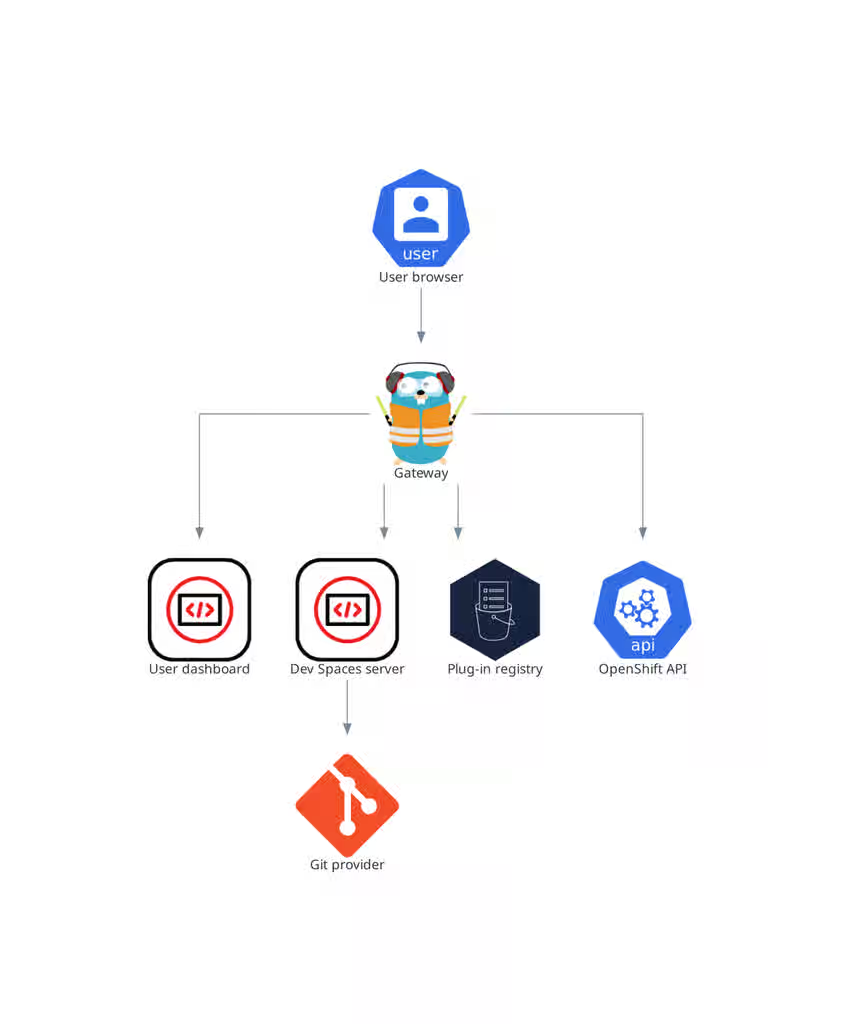
The OpenShift Dev Spaces server components manage multi-tenancy and workspace lifecycle. Understanding these components helps you troubleshoot issues and plan cluster capacity.
Figure 1.2. OpenShift Dev Spaces server components interacting with the Dev Workspace operator
1.1.2. OpenShift Dev Spaces operator
The OpenShift Dev Spaces Operator manages the full lifecycle of OpenShift Dev Spaces server components through the CheCluster custom resource. Creating a CheCluster CR triggers the Operator to deploy the Dev Workspace Operator, gateway, dashboard, server, and plug-in registry.
CheClustercustom resource definition (CRD)-
Defines the
CheClusterOpenShift object. - OpenShift Dev Spaces controller
- Creates and controls the necessary OpenShift objects to run an OpenShift Dev Spaces instance, such as pods, services, and persistent volumes.
CheClustercustom resource (CR)-
On a cluster with the OpenShift Dev Spaces operator, it is possible to create a
CheClustercustom resource (CR). The OpenShift Dev Spaces operator ensures the full lifecycle management of the OpenShift Dev Spaces server components on this OpenShift Dev Spaces instance. These components include the Dev Workspace Operator, gateway, user dashboard, OpenShift Dev Spaces server, and plug-in registry.
1.1.3. Dev Workspace operator
The Dev Workspace Operator (DWO) extends OpenShift to manage workspace pods, services, and persistent volumes by reconciling Dev Workspace custom resources. Every OpenShift Dev Spaces workspace has an underlying Dev Workspace CR that contains the devfile, editor definition, and configuration attributes.
The Dev Workspace CR is an OpenShift resource representation of an OpenShift Dev Spaces workspace. Whenever a user creates a workspace using OpenShift Dev Spaces in the background, Dashboard OpenShift Dev Spaces creates a Dev Workspace CR in the cluster. For every OpenShift Dev Spaces workspace, there is an underlying Dev Workspace CR on the cluster.
Figure 1.3. Example of a Dev Workspace CR in a cluster
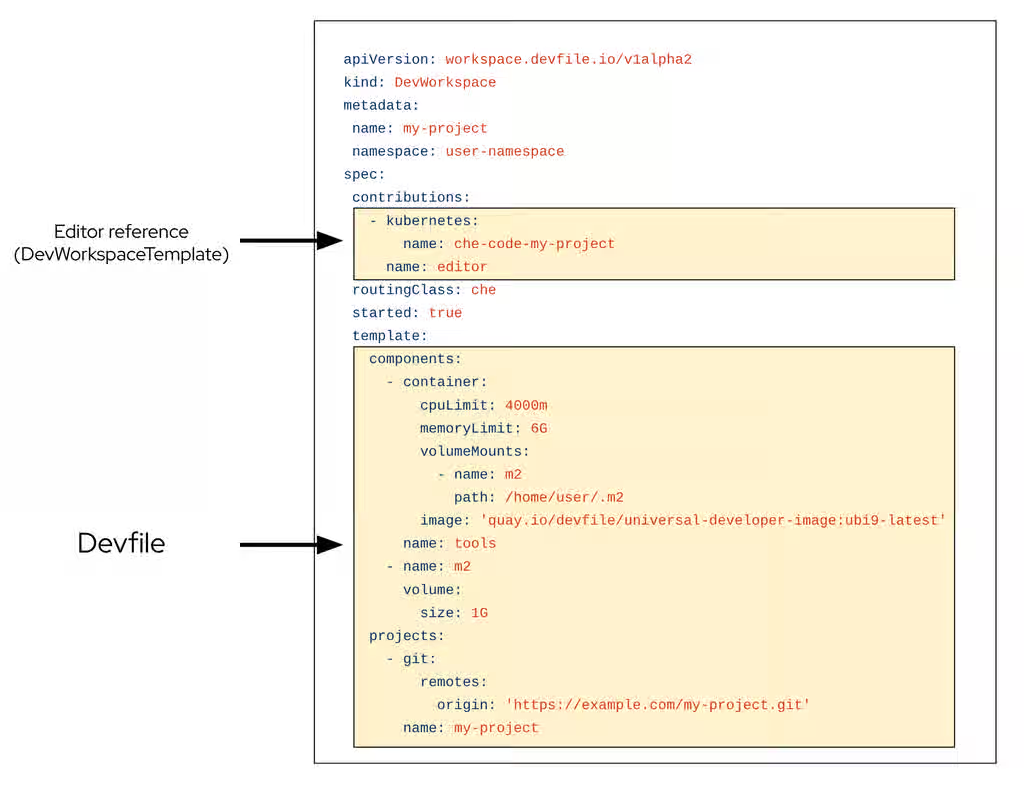
When creating a workspace with OpenShift Dev Spaces with a devfile, the Dev Workspace CR contains the devfile details. Additionally, OpenShift Dev Spaces adds the editor definition into the Dev Workspace CR depending on which editor was chosen for the workspace. OpenShift Dev Spaces also adds attributes to the Dev Workspace that further configure the workspace depending on how you configured the CheCluster CR.
A DevWorkspaceTemplate is a custom resource that defines a reusable spec.template for Dev Workspaces.
When a workspace is started, DWO reads the corresponding Dev Workspace CR and creates the necessary resources such as deployments, secrets, configmaps, and routes. As a result, a workspace pod representing the development environment defined in the devfile is created.
1.1.3.1. Custom Resources overview
The following Custom Resource Definitions are provided by the Dev Workspace Operator:
-
Dev Workspace -
DevWorkspaceTemplate -
DevWorkspaceOperatorConfig -
DevWorkspaceRouting
1.1.3.2. Dev Workspace
The Dev Workspace custom resource contains details about an OpenShift Dev Spaces workspace. Notably, it contains devfile details and a reference to the editor definition.
1.1.3.3. DevWorkspaceTemplate
In OpenShift Dev Spaces the DevWorkspaceTemplate custom resource is typically used to define an editor (such as Visual Studio Code - Open Source) for OpenShift Dev Spaces workspaces. You can use this custom resource to define reusable spec.template content that is reused by multiple Dev Workspaces.
1.1.3.4. DevWorkspaceOperatorConfig
The DevWorkspaceOperatorConfig (DWOC) custom resource defines configuration options for the DWO. There are two different types of DWOC:
- global configuration
- non-global configuration
The global configuration is a DWOC custom resource named devworkspace-operator-config and is usually located in the DWO installation namespace. By default, the global configuration is not created upon installation. Configuration fields set in the global configuration apply to the DWO and all Dev Workspaces. However, the DWOC configuration can be overridden by a non-global configuration.
Any other DWOC custom resource than devworkspace-operator-config is considered to be non-global configuration. A non-global configuration does not apply to any Dev Workspaces unless the Dev Workspace contains a reference to the DWOC. If the global configuration and non-global configuration have the same fields, the non-global configuration field takes precedence.
Table 1.1. Global DWOC and OpenShift Dev Spaces-owned DWOC comparison
| Global DWOC | OpenShift Dev Spaces-owned DWOC | |
|---|---|---|
| Resource name |
|
|
| Namespace | DWO installation namespace | OpenShift Dev Spaces installation namespace |
| Default creation | Not created by default upon DWO installation | Created by default on OpenShift Dev Spaces installation |
| Scope | Applies to the DWO itself and all Dev Workspaces managed by DWO | Applies to Dev Workspaces created by OpenShift Dev Spaces |
| Precedence | Overridden by fields set in OpenShift Dev Spaces-owned config | Takes precedence over global config if both define the same field |
| Primary use case | Used to define default, broad settings that apply to DWO in general. | Used to define specific configuration for Dev Workspaces created by OpenShift Dev Spaces |
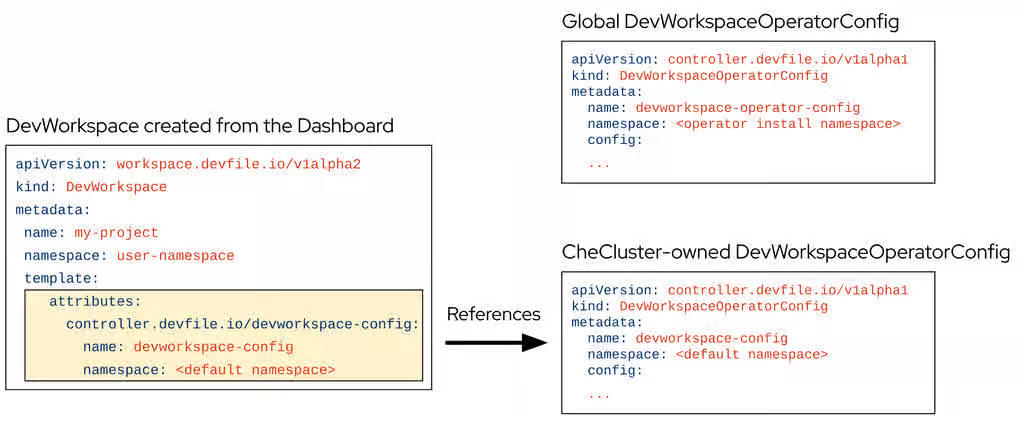
For example, by default OpenShift Dev Spaces creates and manages a non-global DWOC in the OpenShift Dev Spaces namespace named devworkspace-config. This DWOC contains configuration specific to OpenShift Dev Spaces workspaces, and is maintained by OpenShift Dev Spaces depending on how you configure the CheCluster CR. When OpenShift Dev Spaces creates a workspace, OpenShift Dev Spaces adds a reference to the OpenShift Dev Spaces-owned DWOC with the controller.devfile.io/devworkspace-config attribute.
Figure 1.4. Example of Dev Workspace configuration attribute
1.1.3.5. DevWorkspaceRouting
The DevWorkspaceRouting custom resource defines details about the endpoints of a Dev Workspace. Every Dev Workspace has its corresponding DevWorkspaceRouting object that specifies the workspace’s container endpoints. Endpoints defined from the devfile, as well as endpoints defined by the editor definition appear in the DevWorkspaceRouting custom resource.
apiVersion: controller.devfile.io/v1alpha1
kind: DevWorkspaceRouting
metadata:
  annotations:
    controller.devfile.io/devworkspace-started: 'false'
  name: routing-workspaceb14aa33254674065
  labels:
    controller.devfile.io/devworkspace_id: workspaceb14aa33254674065
spec:
  devworkspaceId: workspaceb14aa33254674065
  endpoints:
    universal-developer-image:
      - attributes:
          cookiesAuthEnabled: true
          discoverable: false
          type: main
          urlRewriteSupported: true
        exposure: public
        name: che-code
        protocol: https
        secure: true
        targetPort: 3100
  podSelector:
    controller.devfile.io/devworkspace_id: workspaceb14aa33254674065
  routingClass: che
status:
  exposedEndpoints:
...1.1.3.6. Dev Workspace Operator operands
The Dev Workspace Operator has two operands:
- controller deployment
- webhook deployment.
$ oc get pods -l 'app.kubernetes.io/part-of=devworkspace-operator' -o custom-columns=NAME:.metadata.name -n openshift-operators
NAME
devworkspace-controller-manager-66c6f674f5-l7rhj
devworkspace-webhook-server-d4958d9cd-gh7vr
devworkspace-webhook-server-d4958d9cd-rfvj6
where:
devworkspace-controller-manager-*- The Dev Workspace controller pod, which is responsible for reconciling custom resources.
devworkspace-webhook-server-*- The Dev Workspace operator webhook server pods.
1.1.3.7. Configuring the Dev Workspace-controller-manager deployment
You can configure the devworkspace-controller-manager pod in the Dev Workspace Operator Subscription object:
apiVersion: operators.coreos.com/v1alpha1
kind: Subscription
metadata:
  name: devworkspace-operator
  namespace: openshift-operators
spec:
  config:
    affinity:
      nodeAffinity: ...
      podAffinity: ...
    resources:
      limits:
        memory: ...
        cpu: ...
      requests:
        memory: ...
cpu: ...1.1.3.8. Configuring the Dev Workspace-webhook-server deployment
You can configure the devworkspace-webhook-server deployment in the global DWOC:
apiVersion: controller.devfile.io/v1alpha1
kind: DevWorkspaceOperatorConfig
metadata:
  name: devworkspace-operator-config
  namespace: <DWO install namespace>
config:
  webhooks:
    nodeSelector: <map[string]string>
    replicas: <int>
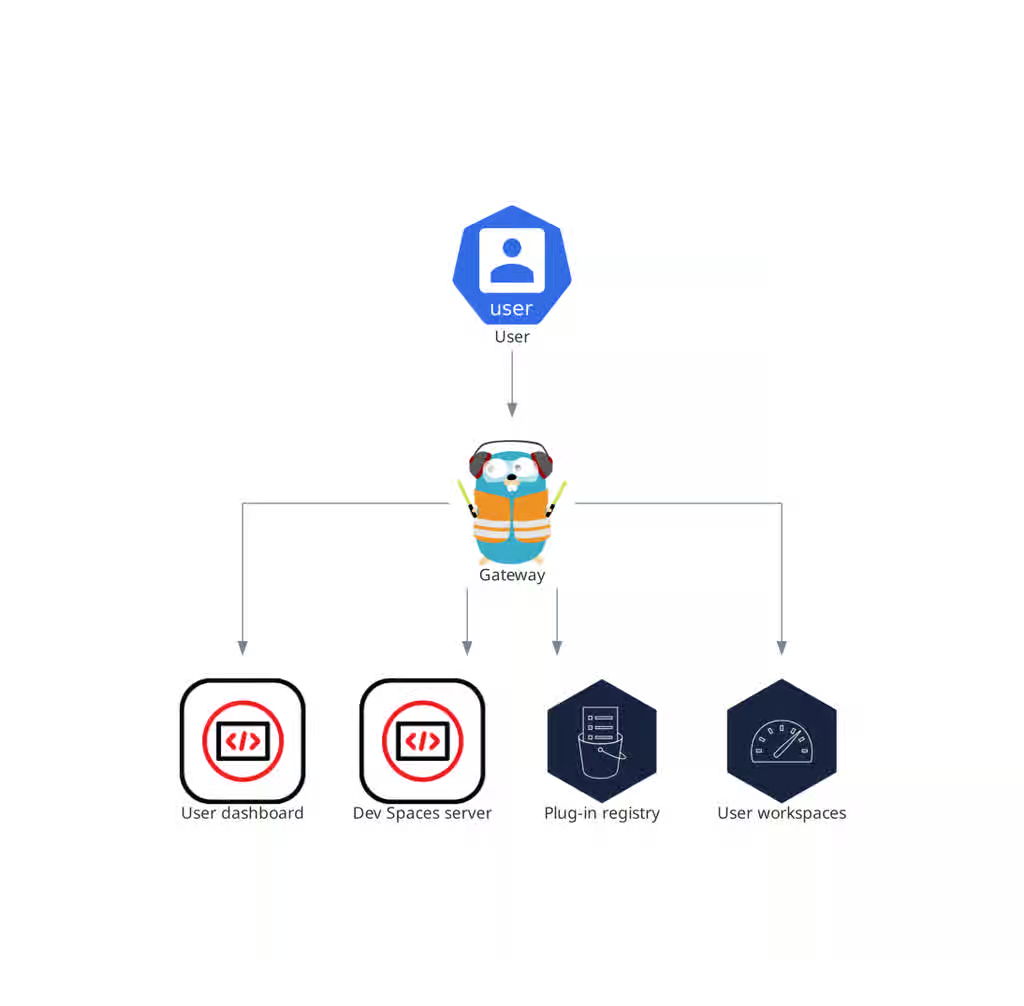
tolerations: <[]corev1.Toleration>1.1.4. OpenShift Dev Spaces gateway
The OpenShift Dev Spaces gateway routes requests, authenticates users with OpenID Connect (OIDC), and enforces OpenShift RBAC policies. It controls access to the dashboard, server, plug-in registry, and every user workspace.
The OpenShift Dev Spaces gateway has the following roles:
- Routing requests. It uses Traefik.
- Authenticating users with OpenID Connect (OIDC). It uses OAuth2 Proxy.
- Applying OpenShift Role Based Access Control (RBAC) policies to control access to any OpenShift Dev Spaces resource. It uses kube-rbac-proxy.
The OpenShift Dev Spaces operator manages it as the che-gateway Deployment.
It controls access to the user dashboard, the OpenShift Dev Spaces server, the plug-in registry, and user workspaces.
Figure 1.5. OpenShift Dev Spaces gateway interactions with other components
Additional resources
- Managing identities and authorizations
- Content from github.com is not included.Traefik
- Content from github.com is not included.OAuth2 Proxy
- Content from github.com is not included.kube-rbac-proxy
- Section 1.1.5, “User dashboard”
- Section 1.1.6, “OpenShift Dev Spaces server”
- Section 1.1.7, “Plug-in registry”
- Section 1.2, “User workspaces”
1.1.5. User dashboard
The user dashboard is the landing page of Red Hat OpenShift Dev Spaces where users create, manage, and access their workspaces. It coordinates with the OpenShift Dev Spaces server, plug-in registry, and OpenShift API to convert devfiles into running workspace pods.
It needs access to the OpenShift Dev Spaces server, the plug-in registry, and the OpenShift Application Programming Interface (API).
Figure 1.6. User dashboard interactions with other components
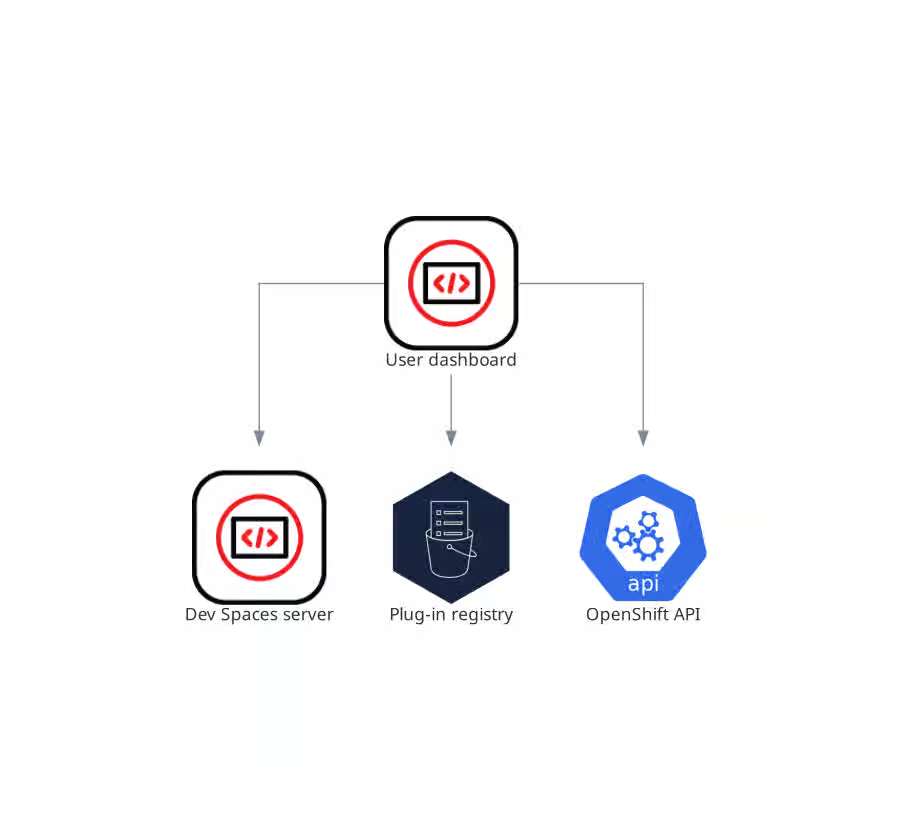
When the user requests the user dashboard to start a workspace, the user dashboard executes this sequence of actions:
- Sends the repository URL to the OpenShift Dev Spaces server and expects a devfile in return, when the user is creating a workspace from a remote devfile.
- Reads the devfile describing the workspace.
- Collects the additional metadata from the plug-in registry.
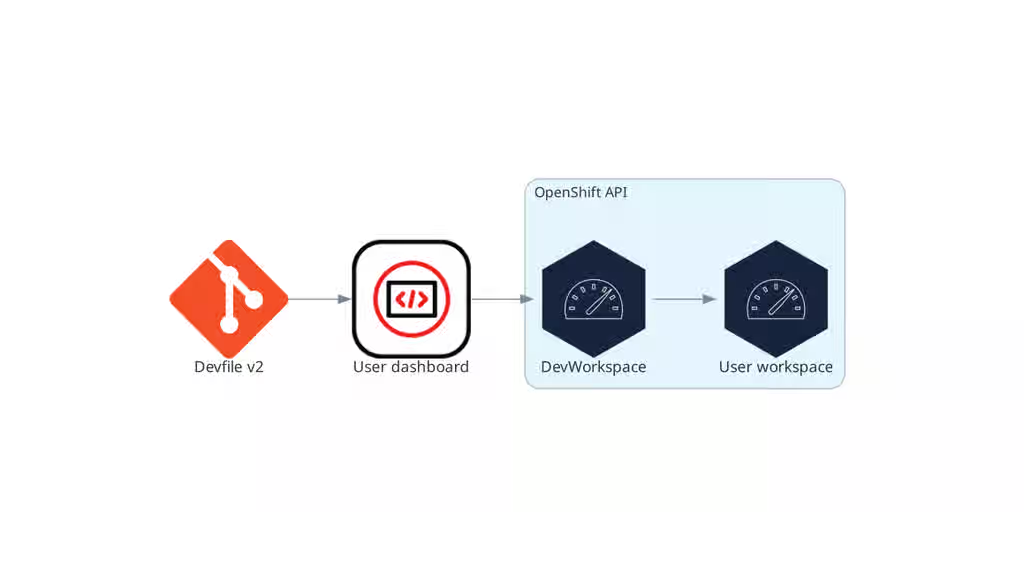
- Converts the information into a Dev Workspace Custom Resource.
- Creates the Dev Workspace Custom Resource in the user project using the OpenShift API.
- Watches the Dev Workspace Custom Resource status.
- Redirects the user to the running workspace IDE.
1.1.6. OpenShift Dev Spaces server
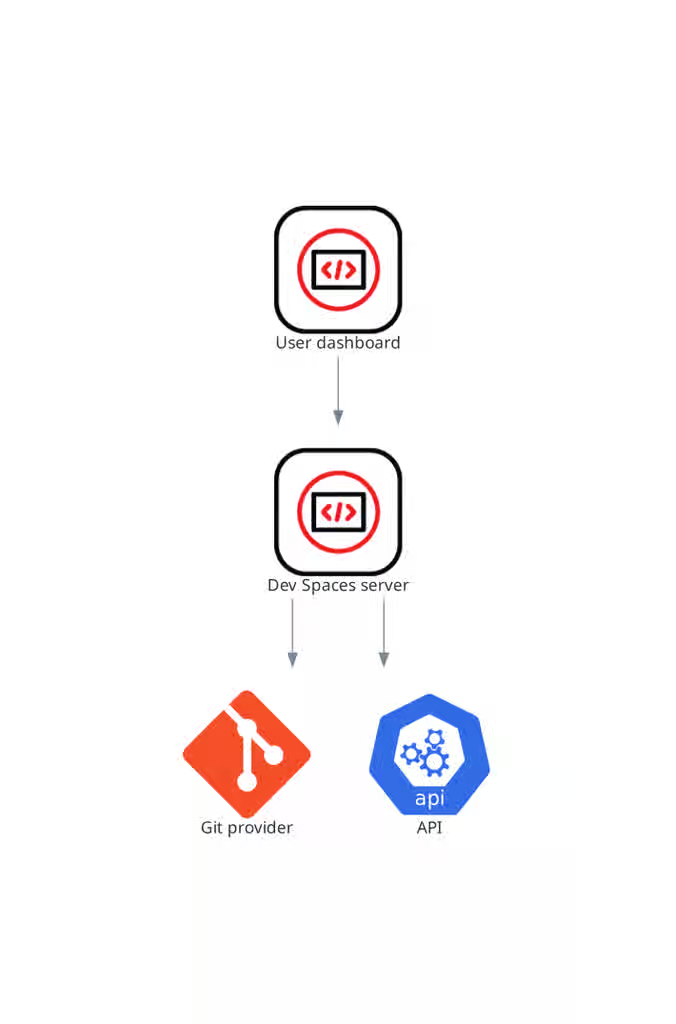
The OpenShift Dev Spaces server is a Java web service that creates user namespaces, provisions them with secrets and config maps, and integrates with Git service providers for devfile fetching and authentication.
The OpenShift Dev Spaces server main functions are:
- Creating user namespaces.
- Provisioning user namespaces with required secrets and config maps.
- Integrating with Git services providers, to fetch and validate devfiles and authentication.
The OpenShift Dev Spaces server is a Java web service exposing a Hypertext Transfer Protocol (HTTP) REST API and needs access to:
- Git service providers
- OpenShift API
Figure 1.7. OpenShift Dev Spaces server interactions with other components
Additional resources
1.1.7. Plug-in registry
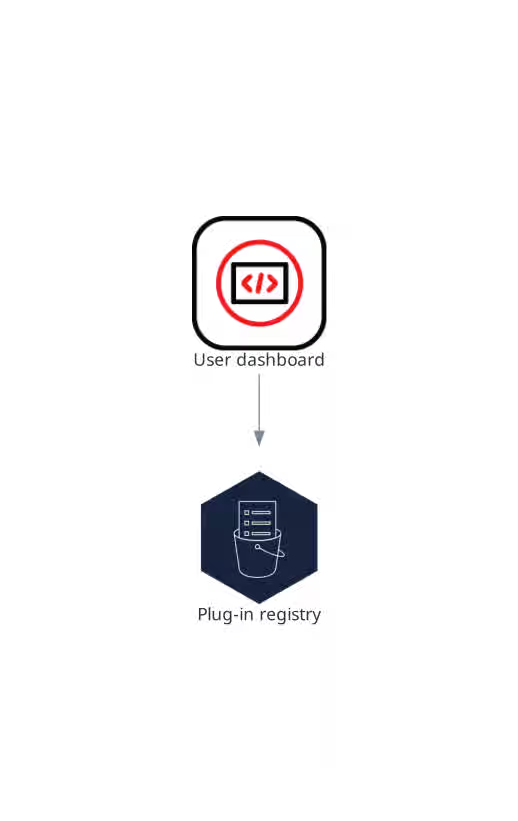
The OpenShift Dev Spaces plug-in registry provides the list of available editors and editor extensions, each described by a Devfile v2. The dashboard reads this registry when assembling the Dev Workspace custom resource for a new workspace.
The user dashboard reads the content of the registry.
Figure 1.8. Plugin registries interactions with other components
1.2. User workspaces
Figure 1.9. User workspaces interactions with other components
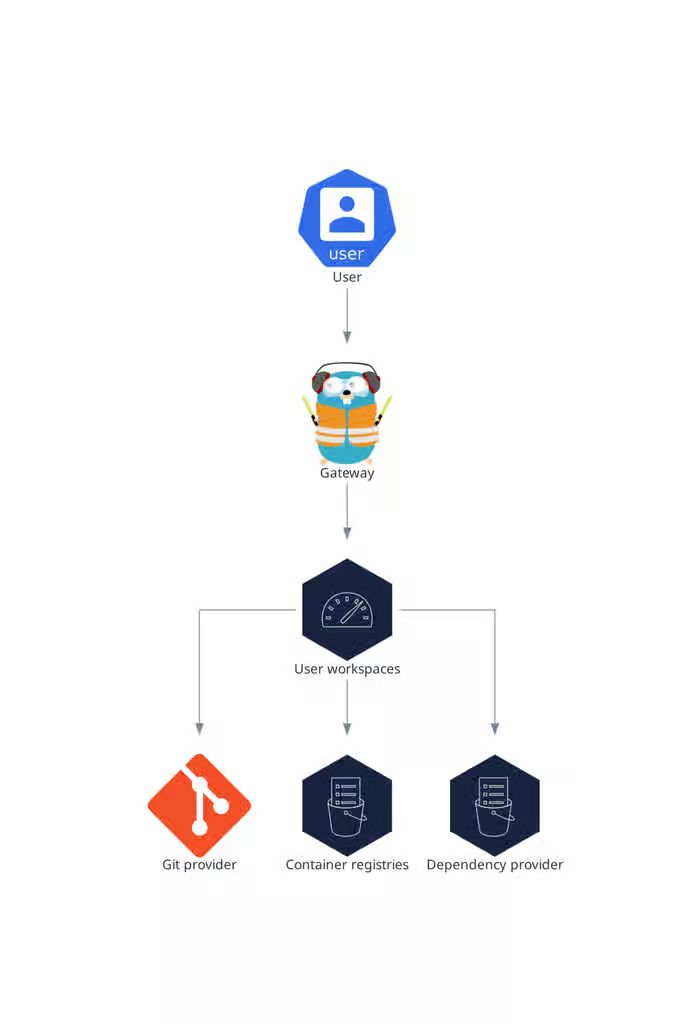
User workspaces provide browser-based IDEs running in OpenShift containers, giving developers on-demand access to editors, language servers, debugging tools, and application runtimes without local setup.
A User workspace is a web application. It consists of microservices running in containers providing all the services of a modern IDE running in your browser:
- Editor
- Language auto-completion
- Language server
- Debugging tools
- Plug-ins
- Application runtimes
A workspace is one OpenShift Deployment containing the workspace containers and enabled plugins, plus related OpenShift components:
- Containers
- ConfigMaps
- Services
- Endpoints
- Ingresses or Routes
- Secrets
- Persistent Volumes (PV)
A OpenShift Dev Spaces workspace contains the source code of the projects, persisted in an OpenShift Persistent Volume (PV). Microservices have read/write access to this shared directory.
Use the devfile v2 format to specify the tools and runtime applications of an OpenShift Dev Spaces workspace.
The following diagram shows one running OpenShift Dev Spaces workspace and its components.
Figure 1.10. OpenShift Dev Spaces workspace components
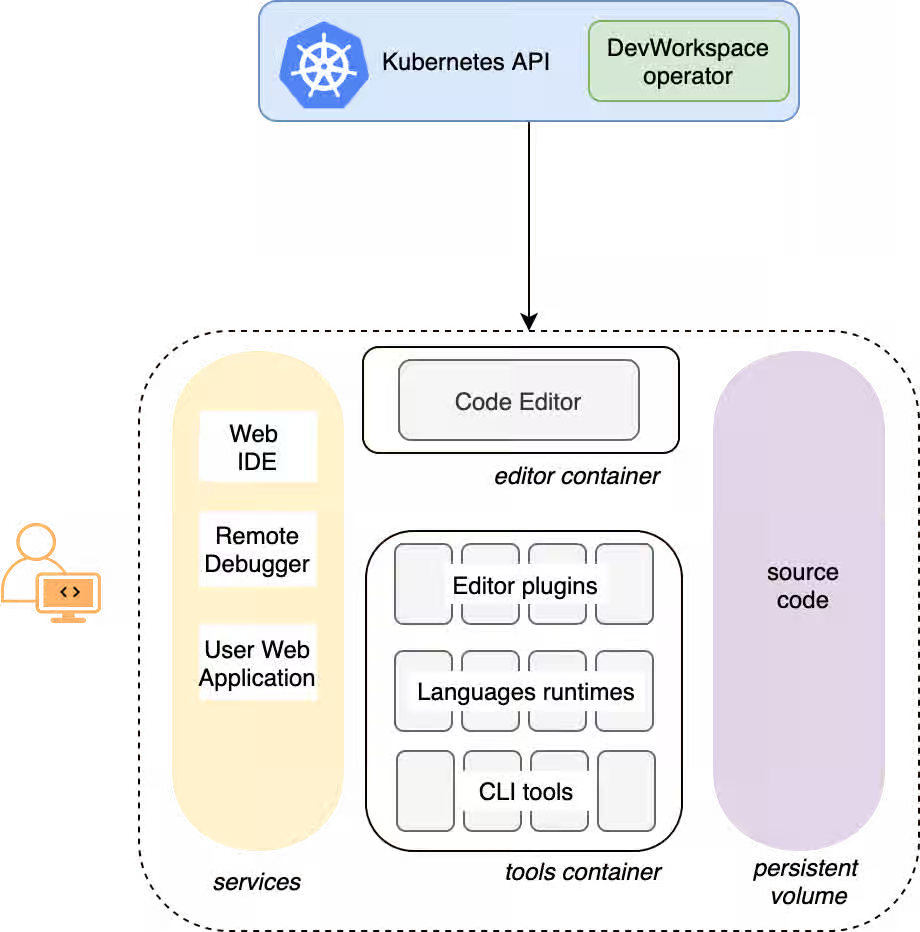
In the diagram, there is one running workspace.
Revised on 2026-05-29 11:07:50 UTC