Discover OpenShift Dev Spaces
Evaluate OpenShift Dev Spaces cloud development environments for your organization
Abstract
Preface
Discover whether OpenShift Dev Spaces meets your organization’s needs for developer onboarding, environment consistency, and enterprise security.
Chapter 1. What is OpenShift Dev Spaces?
Evaluate OpenShift Dev Spaces as a cloud development platform that delivers container-based, reproducible workspaces on OpenShift to accelerate developer onboarding and reduce environment inconsistencies.
Red Hat OpenShift Dev Spaces is an OpenShift-native platform that provides Cloud Development Environments (CDEs) to development teams. OpenShift Dev Spaces creates a CDE for your project. The dashboard and CLI refer to each CDE as a workspace. Instead of configuring local machines, developers get on-demand workspaces: container-based environments with all the tools, dependencies, and IDE access needed to code, build, test, and debug applications.
1.1. Core goals
OpenShift Dev Spaces addresses three fundamental challenges in enterprise software development:
- Accelerate project and developer onboarding
- As a zero-install development environment accessible through a browser or desktop IDE, OpenShift Dev Spaces enables anyone to join a team and contribute to a project within minutes rather than hours or days of local setup.
- Remove inconsistency between developer environments
- Every developer works in the same container-based environment defined by a devfile. Code behaves identically across all team members' workspaces, removing "works on my machine" issues.
- Provide built-in security and enterprise readiness
- OpenShift Dev Spaces keeps source code on the cluster rather than on individual workstations, supports role-based access control through OpenShift RBAC, and integrates with enterprise identity providers through OIDC authentication.
1.2. What OpenShift Dev Spaces provides
- Workspaces
- Container-based developer workspaces running as OpenShift Pods that provide all the tools and dependencies needed for development. Each workspace is isolated, reproducible, and defined by a devfile.
- Browser-based and desktop IDEs
- Microsoft Visual Studio Code - Open Source runs in the browser by default. JetBrains IntelliJ IDEA connects through JetBrains Gateway for a native desktop experience.
- Extensible platform
- Customize workspaces through devfiles and Visual Studio Code extensions from Open VSX registries. Platform engineers define standardized environments that developers consume without manual configuration.
- AI coding assistants
-
Platform administrators configure AI providers centrally through the
CheClustercustom resource. Developers access AI-powered code completion and chat in their workspace IDE without managing API keys individually. Air-gapped deployments can connect to self-hosted models. - Enterprise integration
- OpenShift-native deployment through an Operator, OIDC authentication, OpenShift RBAC for access control, and integration with Prometheus for monitoring.
1.3. Workspace model
OpenShift Dev Spaces defines a workspace as the project source code together with all dependencies necessary to edit, build, run, and debug it. The IDE and development runtime are treated as workspace dependencies, embedded and always included. This differentiates OpenShift Dev Spaces from traditional development environments where the IDE is bound to a workstation and runtimes are configured locally.
OpenShift Dev Spaces workspaces are OpenShift Pods that replicate application runtimes used in production and provide a development layer on top: intelligent code completion, debugging, and IDE tools. Workspaces are isolated from one another and manage the lifecycle of their own components. Additional resources describes the architecture that delivers these workspaces, the server deployments that manage multi-tenancy, and the internal structure of each workspace pod.
Chapter 2. What problems does OpenShift Dev Spaces solve?
OpenShift Dev Spaces solves six common development workflow problems by providing ready-to-code cloud workspaces from Git repositories. Developers open a URL and start coding within minutes.
2.1. Environment inconsistency
When every developer configures their own local environment, differences in OS versions, tool versions, and dependencies cause "works on my machine" failures. OpenShift Dev Spaces uses devfiles, declarative YAML files that define the exact tools, runtimes, and dependencies for a project. Every developer who opens the same repository gets an identical environment.
2.2. Slow developer onboarding
New team members must install tools, clone repositories, configure credentials, and troubleshoot build failures before writing their first line of code. With OpenShift Dev Spaces, a new developer opens the dashboard URL, pastes the team’s repository link, and has a fully configured workspace within minutes.
2.3. Security and credential management
Local development environments store credentials on individual laptops. OpenShift Dev Spaces centralizes credential management through OAuth integration with Git providers and OpenShift RBAC. Developer tokens are stored as OpenShift Secrets on the cluster, not on individual machines.
2.4. Environment drift over time
Even teams that start with consistent environments drift as developers install different extensions, update tools independently, or modify configurations. OpenShift Dev Spaces rebuilds the workspace container from the devfile on each start, so the base toolchain is always consistent. The /home/user directory persists across restarts by default, preserving personal preferences and shell history without affecting the standardized tools and runtimes.
2.5. Resource constraints on developer laptops
Complex projects with multiple microservices, databases, and build tools can overwhelm laptop hardware. OpenShift Dev Spaces runs workspaces on cluster infrastructure with configurable CPU, memory, and storage limits. Developers get the resources they need without upgrading their hardware.
2.6. Compliance in regulated environments
Organizations in regulated industries need to control where code is developed and how it is accessed. OpenShift Dev Spaces runs entirely within your OpenShift cluster and supports air-gapped environments with no internet access. In air-gapped deployments, all workspace traffic stays within your network boundary.
Chapter 3. Who is OpenShift Dev Spaces for?
OpenShift Dev Spaces serves two personas: platform administrators who deploy and manage the platform, and developers who use it to write code.
3.1. Platform administrators
Platform administrators install OpenShift Dev Spaces on an OpenShift cluster and manage its lifecycle. Their responsibilities include:
-
Deploying the OpenShift Dev Spaces Operator and configuring the
CheClusterCustom Resource - Setting up OAuth for Git providers so that developers can access repositories without re-entering credentials
- Managing workspace policies such as idle timeouts, resource limits, and maximum workspaces per user
- Monitoring platform health through Dev Workspace Operator metrics and Grafana dashboards
- Upgrading OpenShift Dev Spaces to new versions
Administrators primarily interact with OpenShift Dev Spaces through the OpenShift web console and the oc and dsc command-line tools.
3.2. Developers
Developers receive the OpenShift Dev Spaces dashboard URL from their administrator and use it to create cloud workspaces. Their experience includes:
- Opening a Git repository URL in OpenShift Dev Spaces to launch a workspace with their project code, tools, and dependencies
- Coding in a browser-based IDE (Microsoft Visual Studio Code - Open Source by default) with full terminal access
- Pushing commits, reviewing pull requests, and collaborating with their team from the browser
- Switching between projects by creating multiple workspaces, each isolated in its own container
Developers do not need cluster access, oc sessions, or any local tooling beyond a web browser.
3.3. Team sizes and deployment models
OpenShift Dev Spaces supports different deployment sizes:
- Small teams
- A single OpenShift Dev Spaces instance on a standard OpenShift cluster handles workspace creation, storage, and networking with default settings.
- Growing teams
- As usage increases, configure resource quotas, deploy the Image Puller for faster workspace starts, and set up monitoring to track usage patterns.
- Enterprise deployments
- For security-sensitive environments, consider air-gapped installations and advanced authorization to restrict platform access by team or group. For very large deployments, see the scalability guidance in the planning documentation.
Chapter 4. When to use OpenShift Dev Spaces
OpenShift Dev Spaces is designed for teams that need consistent, secure, and centrally managed development environments on OpenShift. Not every team requires a cloud development platform, so evaluate your development workflow against the use cases below.
4.1. Teams that benefit from OpenShift Dev Spaces
OpenShift Dev Spaces is a strong fit when your team faces one or more of these situations:
- New developers join regularly and need to be productive on day one.
- Builds fail because of differences between developer machines.
- Your organization requires credentials to stay on cluster infrastructure, not on individual machines.
- Development must happen within a controlled network boundary, including air-gapped environments.
- Projects have complex dependency chains that are difficult to reproduce consistently across developer machines.
4.2. What OpenShift Dev Spaces provides for the enterprise
- On-premises control
- OpenShift Dev Spaces runs within your OpenShift cluster. When deployed on-premises, your source code and credentials stay within your own infrastructure.
- Air-gapped deployment
- OpenShift Dev Spaces operates in disconnected environments with mirrored container images and internal extension registries.
- Native OpenShift integration
- OpenShift Dev Spaces uses OpenShift RBAC, OAuth, networking, and storage directly. No additional identity or access management layer is required.
- Open devfile standard
- Workspace definitions use the devfile format, an open standard maintained by the devfile.io community. The community site in Additional resources includes the devfile specification, sample devfiles, and tools for authoring workspace definitions.
4.3. What developers need to work with OpenShift Dev Spaces
Developers need a supported web browser and network access to the OpenShift Dev Spaces dashboard URL. No local tools, CLI installations, or cluster credentials are required.
Additional resources
Chapter 5. How OpenShift Dev Spaces works
OpenShift Dev Spaces delivers cloud development environments through three groups of components: server components that manage multi-tenancy, the Dev Workspace Operator that provisions workspace pods, and user workspaces where developers write code.
5.1. OpenShift Dev Spaces architecture
OpenShift Dev Spaces fits together three groups of components that communicate through Dev Workspace custom resources on OpenShift: server components, the Dev Workspace Operator, and user workspaces. Each group has a distinct role in delivering cloud development environments, and OpenShift RBAC controls access to all resources.
Figure 5.1. High-level OpenShift Dev Spaces architecture with the Dev Workspace operator
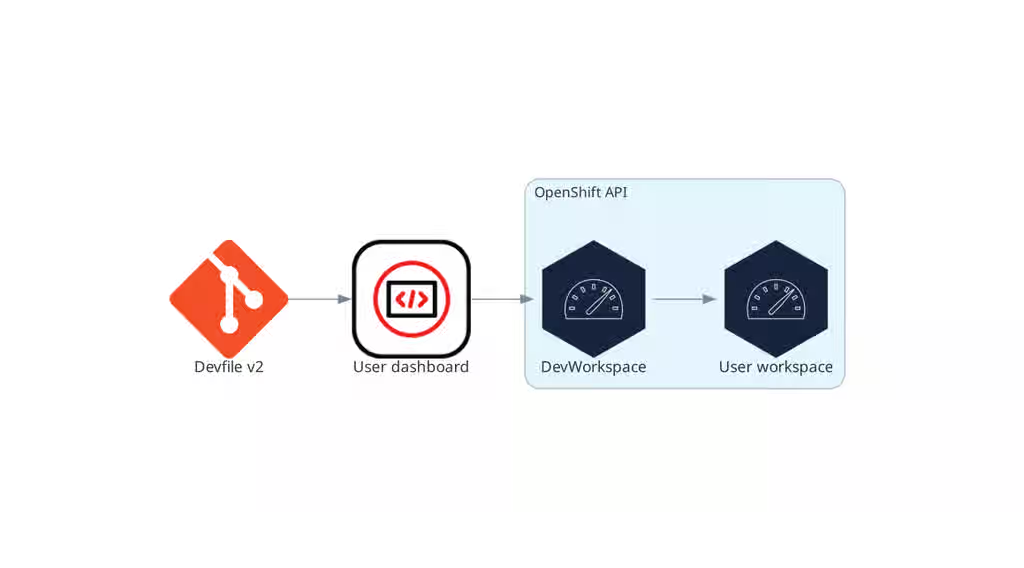
OpenShift Dev Spaces runs on three groups of components:
- OpenShift Dev Spaces server components
- Manage User project and workspaces. The main component is the User dashboard, from which users control their workspaces.
- Dev Workspace operator
-
Creates and controls the necessary OpenShift objects to run User workspaces. Including
Pods,Services, andPersistentVolumes. - User workspaces
- Container-based development environments, the Integrated Development Environment (IDE) included.
The role of these OpenShift features is central:
- Dev Workspace Custom Resources
- Valid OpenShift objects representing the User workspaces and manipulated by OpenShift Dev Spaces. It is the communication channel for the three groups of components.
- OpenShift role-based access control (RBAC)
- Controls access to all resources.
Additional resources links to dedicated pages for the server deployments, the Dev Workspace Operator reconciliation loop, and the structure of user workspace pods. The Dev Workspace Operator repository and the OpenShift Custom Resources documentation provide implementation details.
Additional resources
- Section 5.1.1, “What runs on your cluster”
- Section 5.1.3, “Dev Workspace Operator and workspace pods”
- Section 5.2, “What developers get in a workspace”
- Content from github.com is not included.Dev Workspace Operator repository
- Content from kubernetes.io is not included.Kubernetes documentation - Custom Resources
5.1.1. What runs on your cluster
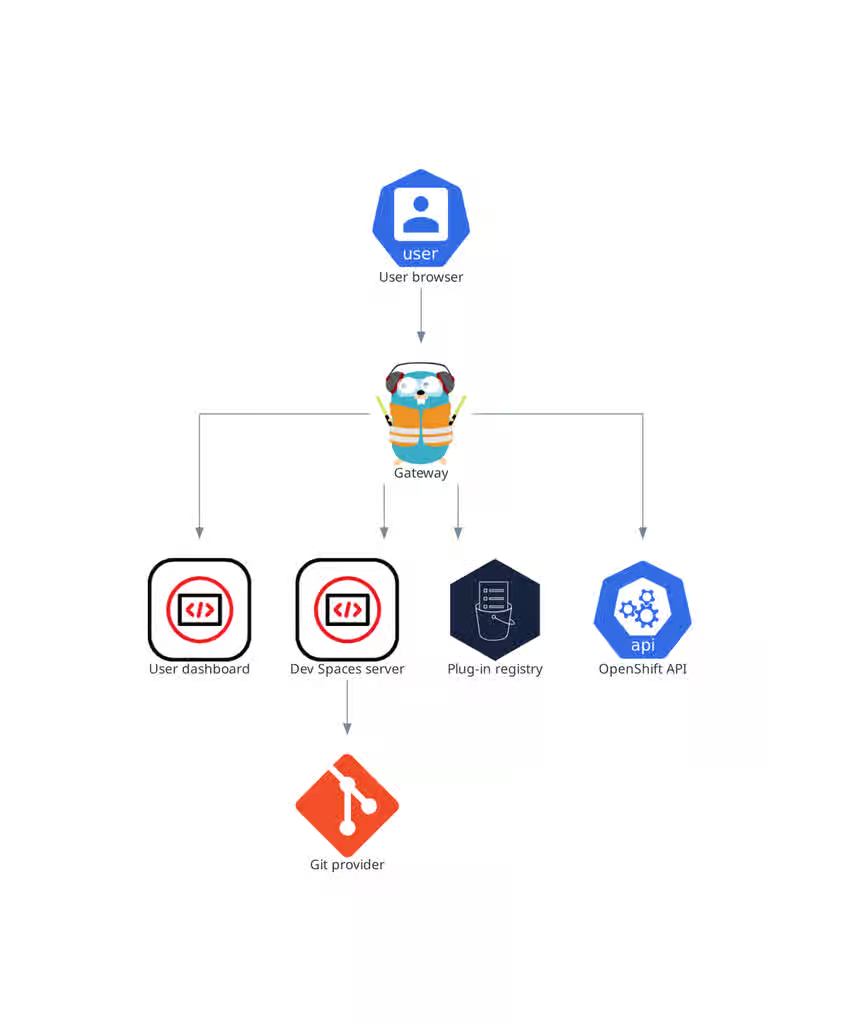
Your cluster runs four OpenShift Dev Spaces server deployments that manage multi-tenancy and workspace lifecycle: the gateway routes and authenticates requests, the dashboard provides the user interface, the server provisions namespaces and integrates with Git providers, and the plug-in registry supplies editor extensions.
Figure 5.2. OpenShift Dev Spaces server components interacting with the Dev Workspace operator
5.1.2. Operator and lifecycle management
The OpenShift Dev Spaces Operator manages the full lifecycle of OpenShift Dev Spaces server components through the CheCluster custom resource. Creating a CheCluster CR triggers the Operator to deploy the Dev Workspace Operator, gateway, dashboard, server, and plug-in registry.
CheClustercustom resource definition (CRD)-
Defines the
CheClusterOpenShift object. - OpenShift Dev Spaces controller
- Creates and controls the necessary OpenShift objects to run an OpenShift Dev Spaces instance, such as pods, services, and persistent volumes.
CheClustercustom resource (CR)-
On a cluster with the OpenShift Dev Spaces operator, it is possible to create a
CheClustercustom resource (CR). The OpenShift Dev Spaces operator ensures the full lifecycle management of the OpenShift Dev Spaces server components on this OpenShift Dev Spaces instance. These components include the Dev Workspace Operator, gateway, user dashboard, OpenShift Dev Spaces server, and plug-in registry. The configuration guide in Additional resources documents every field in theCheClusterCR, and the install guide walks through initial deployment.
Additional resources
- How the central configuration works
- This content is not included.Install OpenShift Dev Spaces
- Section 5.1.3, “Dev Workspace Operator and workspace pods”
- Section 5.1.4, “Gateway and request routing”
- Section 5.1.5, “Dashboard and workspace management”
- Section 5.1.6, “Server and namespace provisioning”
- Section 5.1.7, “Plug-in registry”
5.1.3. Dev Workspace Operator and workspace pods
The Dev Workspace Operator (DWO) manages workspace pods, services, and persistent volumes by reconciling Dev Workspace custom resources on OpenShift. Every OpenShift Dev Spaces workspace has an underlying Dev Workspace CR that contains the devfile, editor definition, and configuration attributes.
The Dev Workspace CR is an OpenShift resource representation of an OpenShift Dev Spaces workspace. Whenever a user creates a workspace using OpenShift Dev Spaces in the background, Dashboard OpenShift Dev Spaces creates a Dev Workspace CR in the cluster. For every OpenShift Dev Spaces workspace, there is an underlying Dev Workspace CR on the cluster.
Figure 5.3. Example of a Dev Workspace CR in a cluster
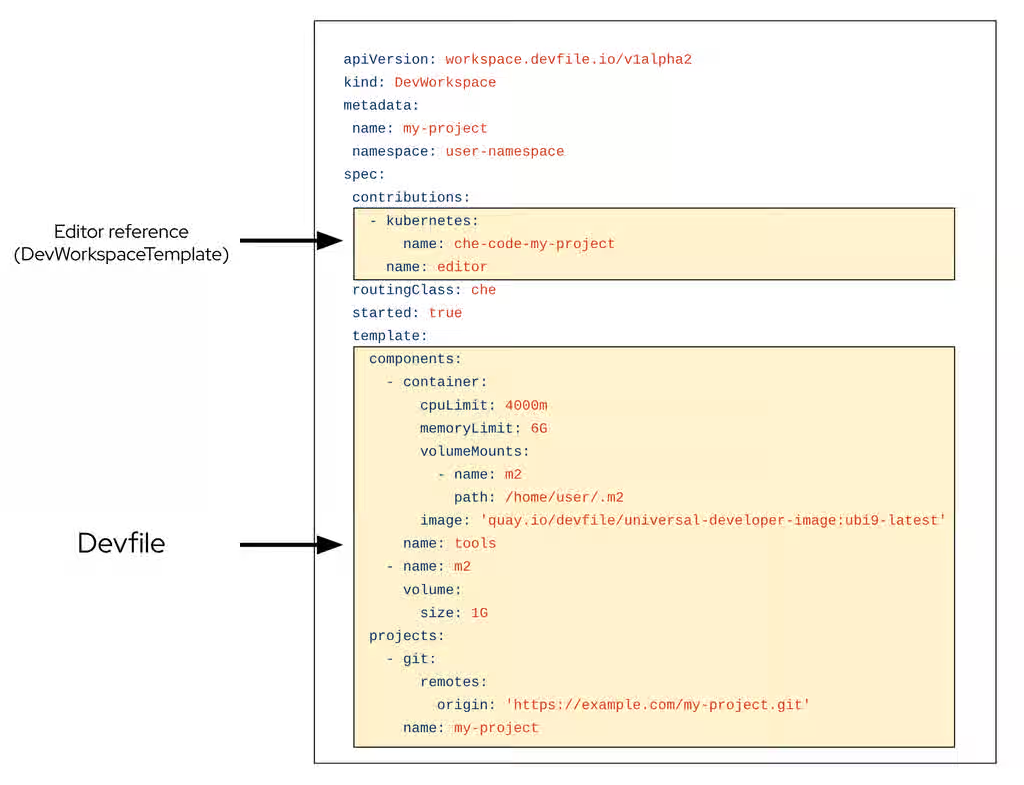
When creating a workspace with OpenShift Dev Spaces with a devfile, the Dev Workspace CR contains the devfile details. Additionally, OpenShift Dev Spaces adds the editor definition into the Dev Workspace CR depending on which editor was chosen for the workspace. OpenShift Dev Spaces also adds attributes to the Dev Workspace that further configure the workspace depending on how you configured the CheCluster CR.
A DevWorkspaceTemplate is a custom resource that defines a reusable spec.template for Dev Workspaces.
When a workspace is started, DWO reads the corresponding Dev Workspace CR and creates the necessary resources such as deployments, secrets, configmaps, and routes. As a result, a workspace pod representing the development environment defined in the devfile is created.
The Dev Workspace Operator provides four Custom Resource Definitions:
-
Dev Workspacecontains devfile details and a reference to the editor definition for each workspace. -
DevWorkspaceTemplatedefines reusable editor and component templates shared by multiple workspaces. -
DevWorkspaceOperatorConfigdefines configuration options for the DWO itself. -
DevWorkspaceRoutingspecifies workspace container endpoints and routing.
The configuration guide in Additional resources documents the fields and options available for each of these custom resources. The Dev Workspace Operator source code, including the CRD schemas, is in the linked upstream repository.
5.1.4. Gateway and request routing
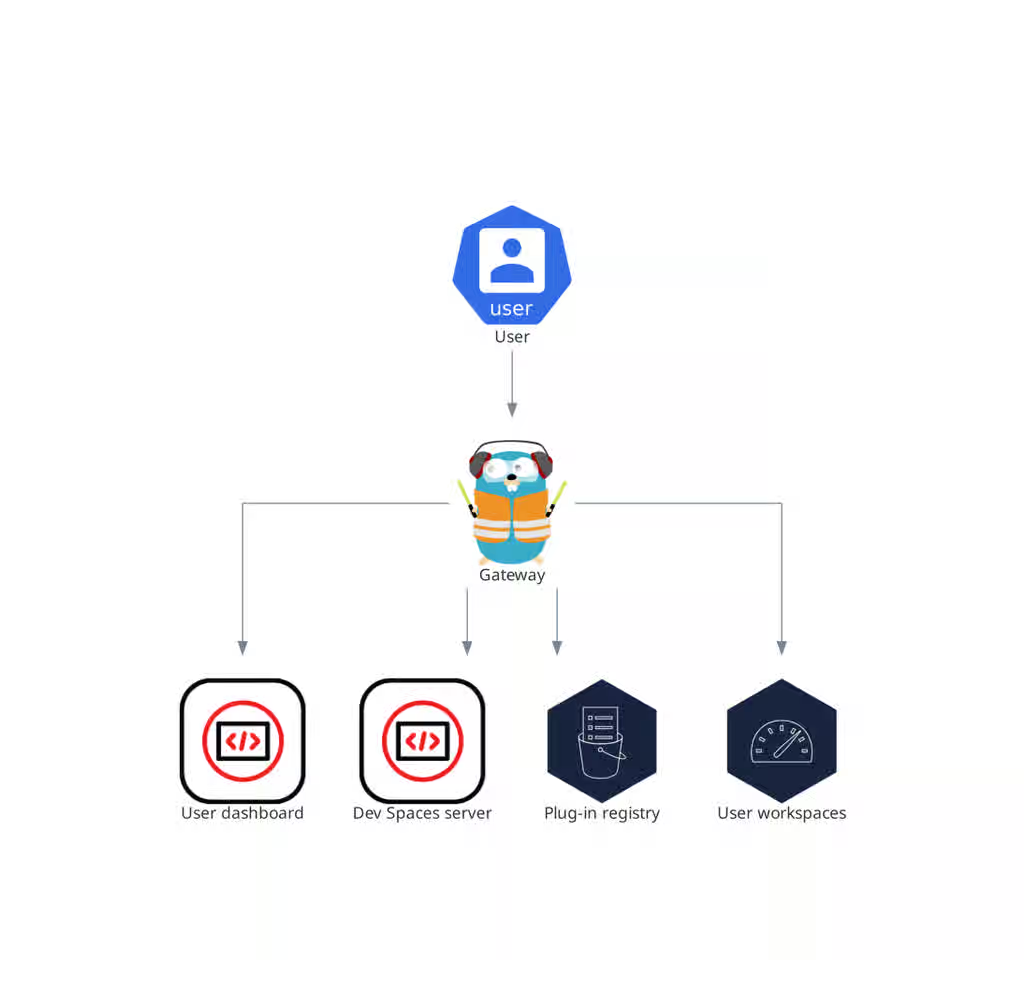
The OpenShift Dev Spaces gateway routes requests, authenticates users with OpenID Connect (OIDC), and enforces OpenShift RBAC policies. It controls access to the dashboard, server, plug-in registry, and every user workspace.
The che-gateway Deployment contains four containers:
-
gateway(Traefik) routes requests to the correct backend service. -
oauth-proxy(OAuth2 Proxy) authenticates users with OpenID Connect (OIDC). -
kube-rbac-proxyapplies OpenShift Role Based Access Control (RBAC) policies to control access to any OpenShift Dev Spaces resource. -
configbumpwatches for configuration changes and reloads Traefik routing rules without restarting the Pod.
Each container performs a distinct security and routing function. The security guide in Additional resources covers how to configure the access control policies that these containers enforce, and the Traefik, OAuth2 Proxy, and kube-rbac-proxy project repositories provide upstream documentation for each container.
Figure 5.4. OpenShift Dev Spaces gateway interactions with other components
Additional resources
- This content is not included.Control who can access OpenShift Dev Spaces
- Content from github.com is not included.Traefik
- Content from github.com is not included.OAuth2 Proxy
- Content from github.com is not included.kube-rbac-proxy
- Section 5.1.5, “Dashboard and workspace management”
- Section 5.1.6, “Server and namespace provisioning”
- Section 5.1.7, “Plug-in registry”
- Section 5.2, “What developers get in a workspace”
5.1.5. Dashboard and workspace management
The user dashboard is the landing page of Red Hat OpenShift Dev Spaces where users create, manage, and access their workspaces. It coordinates with the OpenShift Dev Spaces server and OpenShift API to convert devfiles into running workspace pods.
It is a React application. The OpenShift Dev Spaces deployment starts it in the devspaces-dashboard Deployment.
It needs access to the OpenShift Dev Spaces server and the OpenShift Application Programming Interface (API).
Figure 5.5. User dashboard interactions with other components
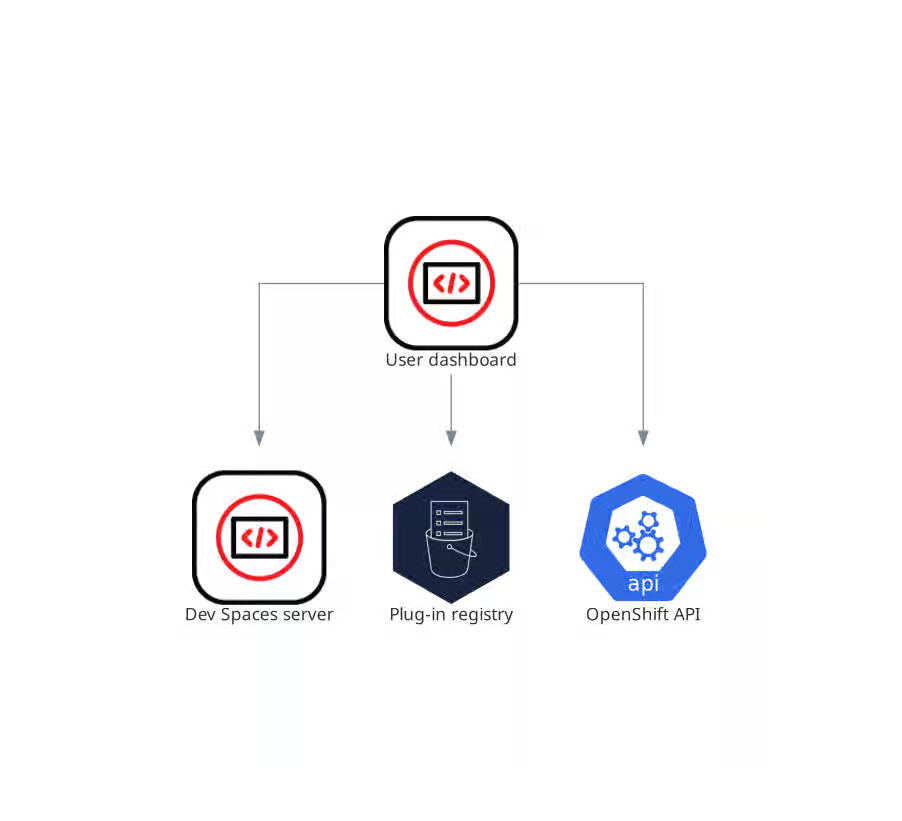
When the user requests the user dashboard to start a workspace, the user dashboard executes this sequence of actions:
- Sends the repository URL to the OpenShift Dev Spaces server and expects a devfile in return, when the user is creating a workspace from a remote devfile.
- Reads the devfile describing the workspace.
- Converts the information into a Dev Workspace Custom Resource.
- Creates the Dev Workspace Custom Resource in the user project using the OpenShift API.
- Watches the Dev Workspace Custom Resource status.
- Redirects the user to the running workspace IDE.
Additional resources
5.1.6. Server and namespace provisioning
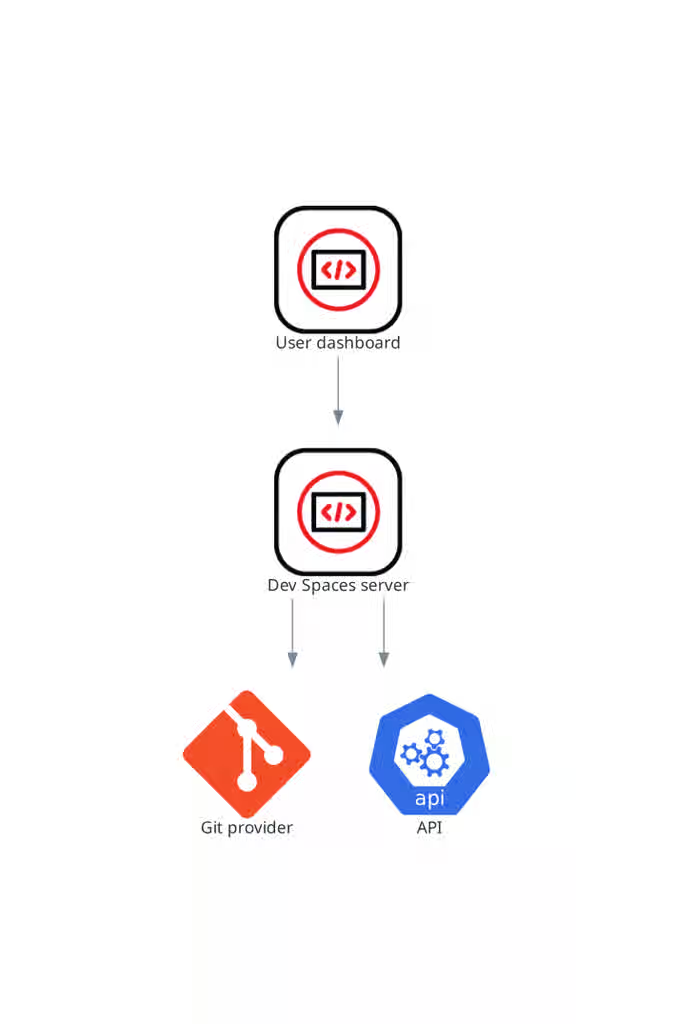
The OpenShift Dev Spaces server is a Java web service that creates user namespaces, provisions them with secrets and config maps, and integrates with Git service providers for devfile fetching and authentication.
The OpenShift Dev Spaces server main functions are:
- Creating user namespaces.
- Provisioning user namespaces with required secrets and config maps.
- Integrating with Git services providers, to fetch and validate devfiles and authentication.
The OpenShift Dev Spaces server is a Java web service exposing a Hypertext Transfer Protocol (HTTP) REST API and needs access to:
- Git service providers
- OpenShift API
Figure 5.6. OpenShift Dev Spaces server interactions with other components
Additional resources
5.1.7. Plug-in registry
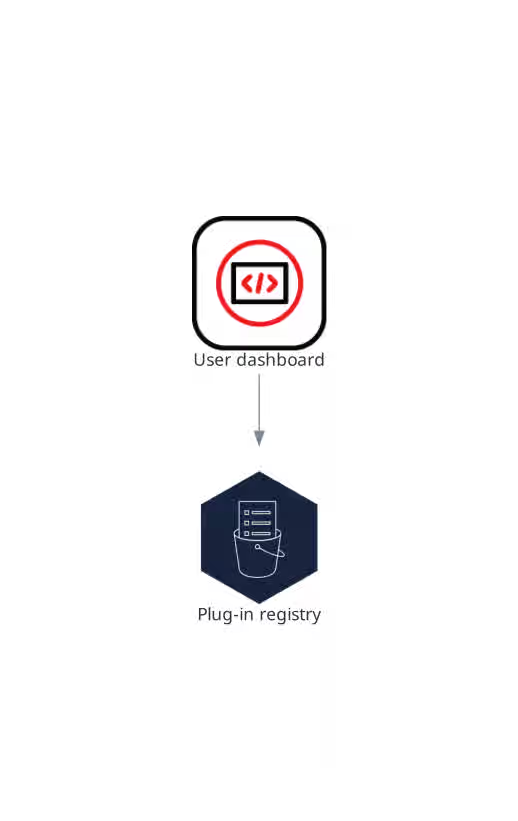
The OpenShift Dev Spaces plug-in registry provides extensions for the Visual Studio Code editor.
The online instance linked in Additional resources provides the latest community version of the registry.
Figure 5.7. Plugin registries interactions with other components
5.2. What developers get in a workspace
Developers get browser-based IDEs running in OpenShift containers, with on-demand access to editors, language servers, debugging tools, and application runtimes without local setup.
Figure 5.8. User workspaces interactions with other components
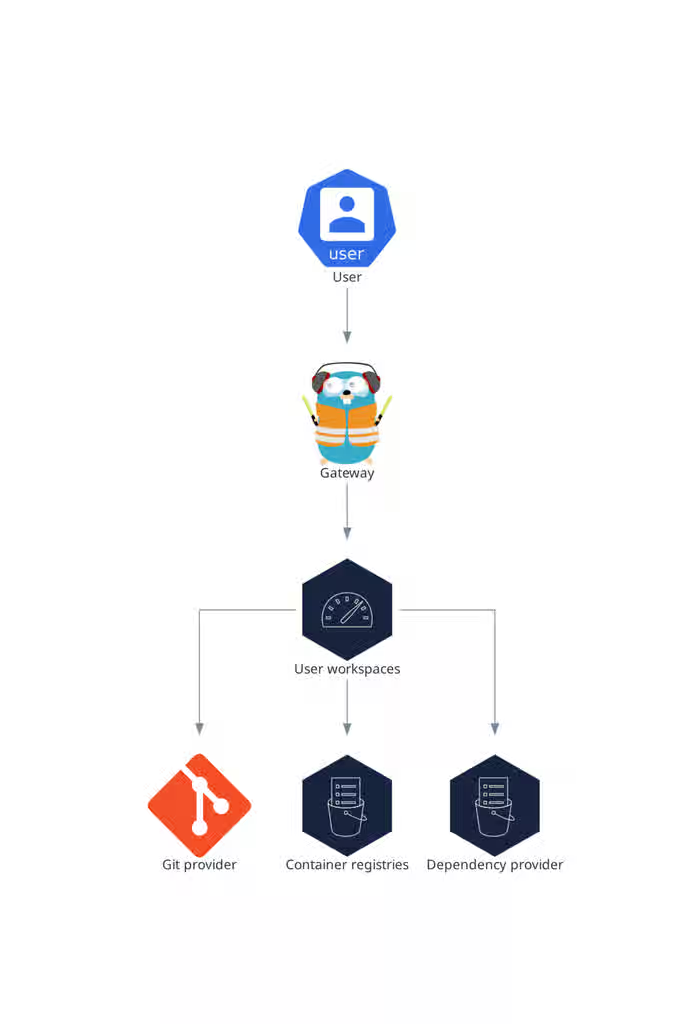
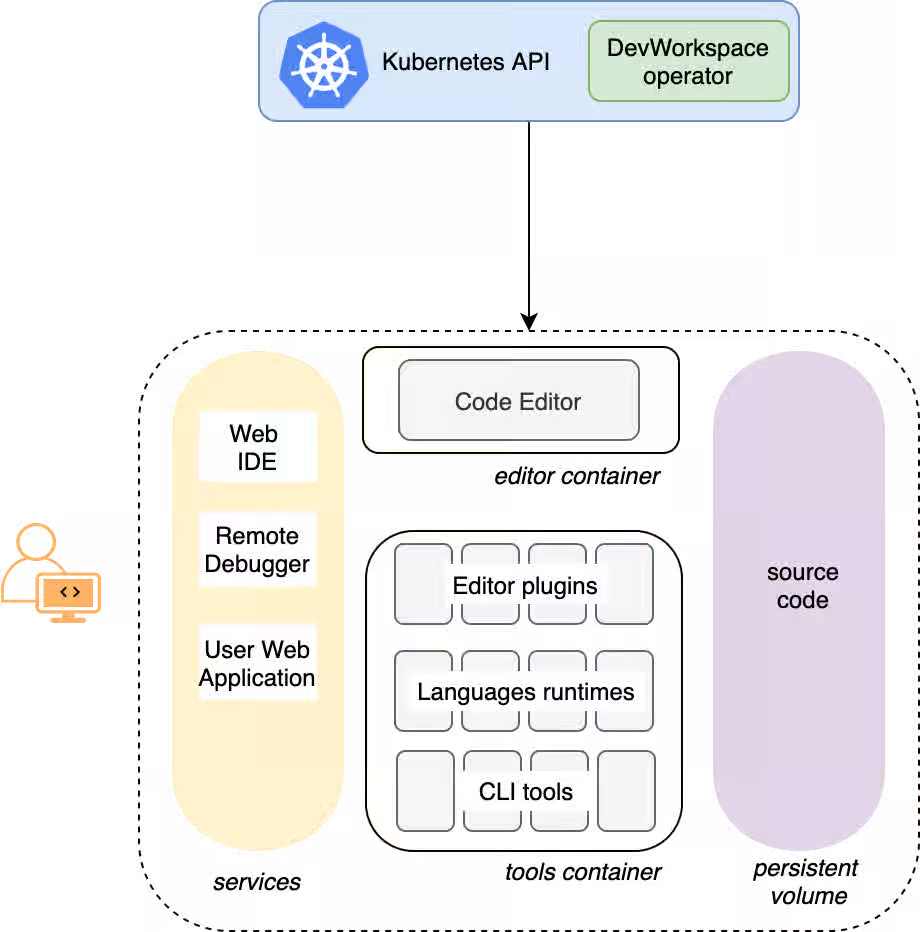
Each workspace runs as an OpenShift Pod containing the IDE, language servers, debugging tools, and application runtimes. Developers interact with the workspace through a browser-based editor or a desktop IDE connected over SSH.
A workspace Pod includes:
- An editor container (Visual Studio Code - Open Source by default, or JetBrains through Gateway)
- A tools container with language servers, compilers, and CLIs defined in the devfile
- A gateway sidecar for request routing
Supporting OpenShift resources created for each workspace:
- A Persistent Volume for project source code (persisted across restarts)
- Services and Routes for IDE endpoint access
- Secrets for Git credentials and workspace configuration
- ConfigMaps for environment-specific settings
The devfile v2 format specifies which tools and runtimes a workspace includes. When a workspace starts, the Dev Workspace Operator reads the devfile and creates all necessary OpenShift resources.
Figure 5.9. OpenShift Dev Spaces workspace components
Chapter 6. Common user roles and tasks
OpenShift Dev Spaces documentation is written for specific user roles. Each guide and procedure identifies its intended audience so that you can find the content relevant to your responsibilities.
6.1. Platform administrator tasks and guides
Platform administrators deploy, configure, secure, upgrade, and monitor OpenShift Dev Spaces on OpenShift clusters. They manage the Operator, the CheCluster custom resource, and the platform infrastructure that developers use.
Common tasks include:
- Deploy OpenShift Dev Spaces on a cluster. See This content is not included.Install Red Hat OpenShift Dev Spaces.
-
Configure the
CheClustercustom resource. See Customize the central configuration. - Set up OAuth for Git providers. See This content is not included.Give developers credential-free Git access.
- Control workspace start times with image caching. See Speed up workspace starts with image caching.
- Upgrade to the latest version. See This content is not included.Upgrade from the web console.
- Monitor metrics and logs. See Configure observability.
6.2. Developer tasks and guides
Developers create workspaces, write code, use IDE extensions, and integrate with Git repositories. They consume the cloud development environments that platform administrators provide.
Common tasks include:
- Create a workspace from a Git repository. See This content is not included.Start a workspace from a Git repository URL.
- Authenticate to Git servers. See This content is not included.Authenticate to Git servers.
- Install and manage IDE extensions. See Automate installation of Visual Studio Code extensions.
- Use devfiles to define workspace configuration. See Author devfiles.
Additional resources
Revised on 2026-07-27 19:47:43 UTC