RHEL 5 or 6 system boots to grub> prompt after a reboot
Environment
- Red Hat Enterprise Linux 5
- Red Hat Enterprise Linux 6
Issue
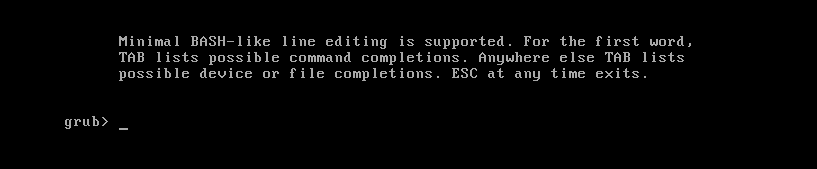
- The system boot process stops at a black & white screen with a grub> prompt.
- server is getting stuck at every reboot at the grub> prompt.
Resolution
- For RHEL 7 and later see RHEL 7 or later system fails at grub> prompt after a reboot.
A system will boot directly into the GRUB command shell if GRUB is intact but no configuration file is present. To bring the system up, either of the following steps could be performed.
-
Use rescue media to gain full access to the system and then restore
/boot/grub/grub.conffrom a local or remote backup. -
Use the interactive GRUB shell to type out the appropriate lines, loading a kernel & initrd file manually before booting. An example of using GRUB interactively with a RHEL5 system follows.
    grub> root (hd0,0)
     Filesystem type is ext2fs, partition type 0x83

    grub> kernel /vmlinuz<Press the tab key here for tab-completion>
     Possible files are: vmlinuz-2.6.18-308.el5 vmlinuz-2.6.18-308.8.2.el5 vmlinuz-2
    .6.18-308.11.1.el5

    grub> kernel /vmlinuz-2.6.18-308.11.1.el5 ro root=/dev/VolGroup00/LogVol00
       [Linux-bzImage, setup=0x1e00, size=0x202e3c]

    grub> initrd /initrd-2.6.18-308.11.1.el5.img
       [Linux-initrd @ 0x37a9a000, 0x555c5e bytes]

    grub> boot
-
To adapt the above interactive method to a specific situation, modify the file paths to the
vmlinuzandinitrdfiles to match up with what a system has. GRUB makes this especially easy because once the appropriate boot filesystem is loaded with theroot (hdN,N)command, the shell does tab-completion for file names -- simply start with a forward slash and press the Tab key. -
That said, GRUB has no way of figuring out the device node name of the root filesystem -- an essential piece of information that will need to be passed to the kernel in order for the boot to succeed. (On a RHEL5 system installed with default partitioning,
/dev/VolGroup00/LogVol00contains the root filesystem, as seen above; however, with RHEL6, the root volume group is named after the system hostname [e.g.,/dev/myhostname/rootor/dev/mapper/myhostname-root]. Note also that the default root LV and VG names can be changed.)
Root Cause
- The
/boot/grub/grub.conffile is missing, empty, or otherwise does not include a set of valid boot configuration settings.- This may occur, for example, when rebuilding the initrd image and the /boot disk runs out of space or has a write failure while updating the grub.conf file or if the grub.conf file is accidentally deleted.
This solution is part of Red Hat’s fast-track publication program, providing a huge library of solutions that Red Hat engineers have created while supporting our customers. To give you the knowledge you need the instant it becomes available, these articles may be presented in a raw and unedited form.